







AI Agents for Field Service Invoicing: Stop Chasing Missing Paperwork

Most billing teams take days to turn a closed work order into a confirmed invoice. If the honest answer to "why" is "it depends on how complete the tech's notes are," that's the problem. Someone is hunting through work orders, parts transactions, and contract records to piece together what happened before a dollar amount can go out.
The difference between an invoice agent and rule-based automation shows up on exactly those incomplete jobs.
What Are AI Agents for Field Service Invoicing?
An AI agent for field service invoicing reads completed job data, checks it against contract and warranty records, and generates an invoice record. It pulls from work orders, asset histories, parts transactions, and customer entitlements already stored in your field service platform. The output is a structured invoice ready to sync to your ERP.
Field service billing is harder than standard accounts receivable work because the data lives in several places. The job closes on a technician's mobile device. Parts come out of inventory. Labor gets logged against an asset, and coverage has to be confirmed before a price is final.
How Are AI Agents Different From Invoice Automation?
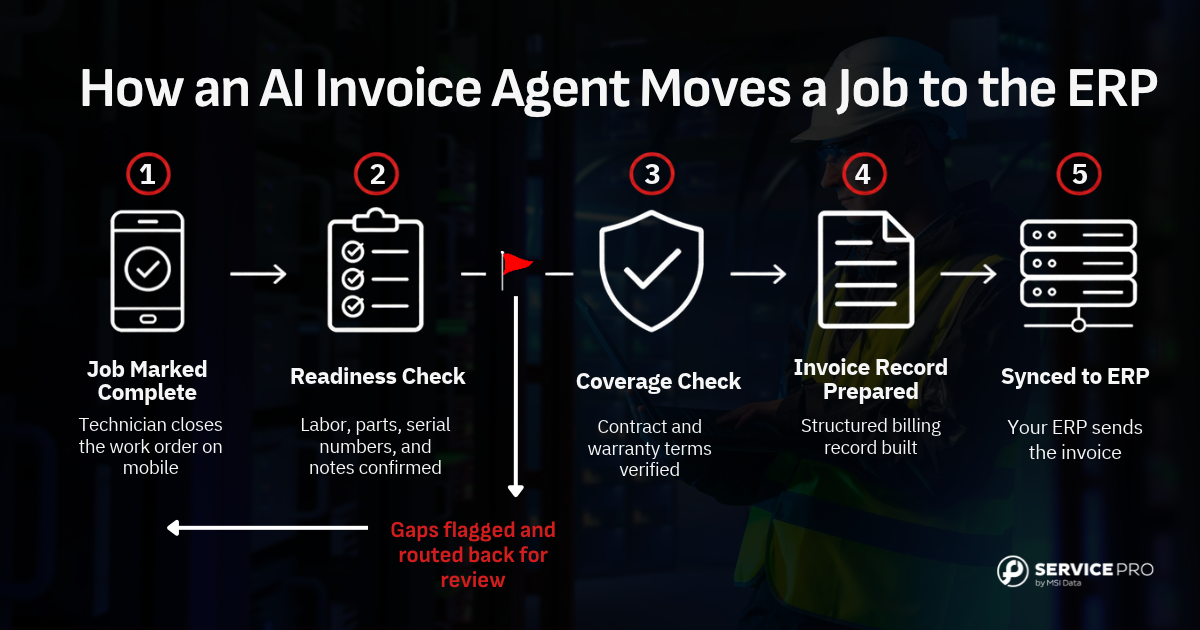
Rule-based automation runs on fixed triggers and breaks when input varies. An AI agent reads job context and applies judgment to inconsistencies. If a technician's notes say "compressor replaced" but the parts list lacks a compressor serial number, rule-based automation stops or errors out. An AI agent flags the gap, suggests the likely part based on the asset model and service history, and routes the work order back to the technician or dispatcher for confirmation before the invoice is generated.

Rule-based systems treat every deviation as a failure. An AI agent treats deviations as normal and resolves them by pulling context from asset records, prior jobs on the same equipment, and contract terms tied to that customer.
Who Needs AI Invoice Agents Most?
AI invoice agents fit best in asset-centric field service organizations with complex equipment and a high volume of completed work orders. Billing in these shops depends on information that originates with the technician. Labor, parts, serial numbers, customer signatures, and contract or warranty coverage all have to reach the back office before an invoice can go out.
These organizations serve power generation, industrial equipment and manufacturing, and commercial HVAC & refrigeration customers. They run 50 or more technicians and keep the ERP as the financial system of record. A job marked complete with no serial number isn't ready to invoice. Someone in billing has to chase the missing details and confirm the right payer and rate.
Close-out in many of these teams runs on paper tickets, spreadsheets, email follow-up, or manual re-entry. An invoice agent flags incomplete job records and billing exceptions before they reach the ERP. Anything that needs judgment goes to a person for review.
How Does AI Field Service Invoicing Work?
The process runs as a sequence. A technician marks a job complete on their mobile device; the AI agent reads the closed work order, checks for completeness, verifies coverage against the customer's active contracts or warranty terms, and generates a structured invoice record that syncs directly to the ERP. The agent only advances when the prior step passes its readiness check.
How Does the Agent Capture Job Data?
The agent reads structured data from the closed work order: labor time, parts used, technician notes, photos, and the asset ID. Service Pro by MSI Data accepts voice, text, and images from the field, so the technician doesn't need to type a full report. The agent pulls from records that already exist in the platform rather than waiting for a human to transcribe handwritten notes or interpret a scanned PDF.
This is what separates field service invoice agents from accounts payable invoice agents. AP tools are built to extract data from supplier invoices. Field service invoice agents generate customer invoices from job records — they’re reading unstructured technician notes and translate them into billable line items by matching the narrative to parts transactions, labor codes, and the asset's service history.
How Does the Agent Check Invoice Readiness?
Invoice readiness means the labor hours are logged, the parts are recorded with serial numbers, the asset ID is matched to a customer record, and the technician's notes are complete enough to support a line item. The agent checks these fields automatically and flags gaps before the invoice is generated, rather than after a billing coordinator has already spent time building the draft.
When the agent catches a gap at job close rather than at billing review, the technician is still on-site and can provide the missing information without reconstructing the job from memory. The first-pass invoice rate rises because problems surface while the context is fresh. Common readiness flags include:
- Missing serial number: A part was logged but the serial number field is blank, which blocks warranty coverage verification.
- Unmatched asset ID: The asset on the work order doesn't link to a customer record, so the coverage check can't run.
- Unapproved labor hours: Hours are entered but not approved, which leaves the billable amount unconfirmed.
- Incomplete technician notes: The notes do not describe the work performed in enough detail to support a line item.
How Does the Agent Check Coverage?
The agent pulls the asset record, labor and parts, and any contract or warranty terms into one view of the completed job. Billing teams stop searching across systems to figure out who pays for routine work.
Coverage turns on details like the type of work and whether the job record carries the required documentation. For jobs with clear rules, the agent recommends a payer and rate. Missing information, overlapping coverage, or terms open to interpretation send the job to a billing or warranty specialist.
How Does the Invoice Reach the ERP?
An integration on its own moves a work-order summary into the ERP. It still isn't ready to bill. Pricing depends on contract terms, warranty coverage, and job-level details. Much of that data lives outside the financial system. Once the job is fully documented, the agent adds that context and prepares a structured billing record for the ERP. Nobody re-keys the work between field operations and the back office.
Service Pro integrates with Sage 100, NetSuite, Epicor Kinetic, Prophet 21, and Microsoft Dynamics 365 Business Central.
What Metrics Prove Invoice AI Works?
Service managers building an internal case for invoice agents should track these numbers before and after deployment. These are specific, measurable outcomes a service leader can pull today as a baseline and compare against after go-live.
How Do You Track Time-to-Invoice?
Time-to-invoice is the number of calendar days between a technician marking a job complete and a confirmed invoice record appearing in the ERP. Reference customers were seeing 16+ days before automation.
A long time-to-invoice signals that billing depends on human follow-up rather than structured data capture. When the agent is working, this number compresses because the data is captured at job close rather than reconstructed afterward.
How Do You Track First-Pass Invoices?
First-pass invoice rate measures the share of completed jobs that become invoices without billing rework. To raise it, log every hold and correction with a reason. Missing work details, coverage questions, pricing, tax, and coding errors each point to a different field-to-finance handoff.
Missing details are easier to fix on site. Service leaders at MSI Data's 2026 roadshow put the cost of a return trip for one missing equipment photo at $200 to $250, including wages and fuel. If a technician closes a job without the removed part's serial number, the agent flags it before the record moves to billing. The coordinator building the invoice starts from a complete record.
How Do You Track Revenue Leakage?
Revenue leakage is billable work that gets written off, underbilled, charged to the wrong payer, or never invoiced. The two common sources in field service are incomplete job documentation and coverage nobody confirmed before billing.
Track leakage in dollars, tagged by cause. The reason codes from first-pass invoice rate apply here too. Add one more for jobs still unbilled after a set number of days. Sorted by dollar value, the list shows service leaders whose handoffs cost the most.
Where Do Invoice Agents Fit in Field Service?
The agent sits inside the field service management platform and connects field execution to back-office posting. It touches multiple roles without requiring any of them to change their primary tools.
How Do Agents Help Technicians Close Jobs?
The technician's job doesn't change. They still close the work order on their mobile device. What changes is that the platform guides them to complete the fields the agent needs before the job is marked done.
Service Pro's Job Prep Brief surfaces asset history and required documentation at the point of work, so the technician has what they need to close the job completely. If a warranty claim requires a removed-part serial number and a failure code, the agent prompts the technician to capture those fields before the job can be marked complete. The technician is being asked while still on-site and the context is fresh, which eliminates the back-and-forth that slows time-to-invoice.
How Do Agents Help Billing Teams?
Billing coordinators shift from assembling invoices to reviewing flagged exceptions. The agent handles the routine jobs (complete data and clear coverage with straightforward ERP posting) and surfaces only the jobs that need a human decision.
A flagged exception might be:
- Competing coverage: Both warranty and a service contract apply, and the agent needs a human to choose which takes precedence.
- Contradictory data: The technician's notes describe work that doesn't match the parts list, and the agent can't resolve the discrepancy without confirmation.
- Billing threshold: The job exceeds a dollar amount that requires manager approval before posting.
The coordinator reviews the flag, makes the decision, and the agent generates the invoice. Their time shifts from data entry to judgment calls.
How Do Agents Help Service Leaders?
The controller who doesn't have real numbers until a Tuesday-morning batch report runs is the person this changes most. Service Pro's Ops Intelligence layer surfaces daily profitability reporting rather than waiting for the ERP to close the period.
The agent logs every coverage decision and every flagged exception, creating a real-time view of billing status across the operation. If warranty write-offs are spiking on a particular asset model or customer, the service leader can see that in real time and investigate before the month closes.
What Breaks AI Invoice Automation?
Invoice agents break under predictable conditions. Service leaders who understand those conditions before go-live avoid the trust deficit that comes from a failed implementation. These are the same conditions that break manual billing processes, just faster and more visibly.
What Data Has to Be Clean?
The agent reads from existing records. If asset records are incomplete (missing serial numbers, no service history, or unlinked customer contracts, among other gaps), the coverage check fails, and the invoice can't be generated without human intervention.
Audit asset records and active contracts before activating the agent. If 30% of your assets are missing serial numbers or have no linked service history, the agent flags 30% of your jobs as exceptions on day one. The agent surfaces data quality problems that were already slowing manual billing, but it does so immediately rather than letting them hide in the billing coordinator's daily workarounds.
Clean data doesn't mean perfect data. It means the fields the agent needs to make a coverage decision are populated and accurate. For most field service operations, that’s:
- Asset ID and serial number: Required to match the job to a customer record and run the coverage check.
- Customer contract status: Active, expired, or pending, with coverage dates and terms linked to the asset.
- Parts catalog with SKU and serial tracking: Required to confirm parts consumption and match installed or removed parts to warranty records.
If those fields are clean for 80% of your assets, the agent handles 80% of your jobs without human intervention, and the remaining 20% get flagged for review.
Where Should Humans Approve Invoices?
Not every invoice should flow straight through. Define the conditions that require review, such as invoices above a defined billing threshold, first-time customers, incomplete job documentation, ambiguous contract or warranty coverage, unusual pricing, or disputed asset status.
The agent can handle routine, well-documented jobs and prepare recommendations for the rest. When the record is incomplete or the billing treatment is unclear, the job should be routed to the appropriate billing, warranty, or finance reviewer before the invoice reaches the ERP.
How Should You Handle Data Security?
Field service invoice data includes customer contract terms, asset records, and billing history. Trust is the blocker for AI adoption in this audience. Service Pro is purpose-built on the customer's own asset records, work orders, and service history. The agent reads from and writes to the organization's own platform and ERP and doesn't send data to a general-purpose AI endpoint.
Using a general-purpose AI tool like ChatGPT to help with billing decisions exposes customer data to a third-party model without contractual data protection. A purpose-built invoice agent runs inside the field service platform, where access controls, audit logs, and data residency are already managed.
How Should You Roll Out Invoice Agents?
Invoice agents change who touches a job between close-out and billing. Before the agent handles real volume, a rollout needs a narrow starting point, a clear owner, and a back office that trusts its output.
Where Should the First Pilot Start?
Start with one job type that has predictable, consistent data: a standard preventive maintenance visit on a known asset class, or a recurring service call under an active contract. Avoid warranty-heavy or multi-party jobs where coverage decisions are complex.
The internal argument a service manager has to win with their own leadership is that the agent produces clean invoices faster, and that argument is easiest to make with a controlled, high-volume job type. Run the pilot long enough to see the time-to-invoice metric move. If your baseline is 4.1 days and the pilot compresses that to same-day for the controlled job type, you have a concrete proof point to expand. If the pilot doesn't move the metric, the problem is either incomplete data or the wrong job type.
Who Should Own the Workflow?
The service manager or director of field services should own the workflow design because they understand how billing decisions are actually made. IT handles the technical integration, but the business logic (which jobs require approval, what the billing threshold is, how to handle ambiguous coverage, and what triggers escalation) comes from the service team.
Workflow ownership also means owning the exception queue: who sees flagged jobs, how quickly they respond, what happens if a flagged job sits unreviewed for too long, and who has override authority. Those are operational decisions.
How Do You Build Trust in the Agent?
Run a parallel period where billing coordinators compare the agent's output against their own manual invoice drafts. Consistent matches give the team its own evidence.
Some billing teams have already tried AI tools and gotten unusable output. Side-by-side review lets them judge the agent on their own jobs before trusting it with volume. Every Service Pro trial includes a forward-deployed engineer who works alongside the team through this period and adjusts the setup as feedback comes in. Side-by-side review also exposes work the agent wasn't built for, such as warranty coverage prorated by asset age. The workflow then routes that kind of work to a person.
Frequently Asked Questions
Can AI agents generate invoices directly from closed work orders?
Yes. The agent reads the completed work order record, checks coverage, and generates the invoice record without a billing coordinator manually assembling the fields. The work order data must be complete for the agent to proceed without flagging a gap.
Do AI invoice agents replace billing staff?
No. The agent handles routine invoices that have complete data and clear coverage. Billing staff handle exceptions, disputed coverage decisions, and jobs that fall outside standard parameters, shifting their time from data reconstruction to exception review.
What field data does an AI invoice agent need to generate an invoice?
The agent needs asset ID, labor hours logged, parts used with quantities, technician notes sufficient to describe the work performed, and the customer's active contract or warranty record linked to that asset. Missing any of these triggers a flag rather than a failed invoice.
Can AI invoice agents work with an existing ERP?
Yes, provided the field service platform has a native integration or API connection to the ERP. Service Pro supports Sage 100, NetSuite, Epicor Kinetic, Prophet 21, and Microsoft Dynamics Business Central. The agent posts structured invoice records to the ERP rather than replacing it.
Can AI agents catch warranty and contract coverage gaps before an invoice goes out?
Yes. The agent cross-references the asset, the work performed, and the customer's active records before generating the invoice, flagging any job where coverage is ambiguous coverage rather than defaulting to a write-off.
How quickly do field service teams see a reduction in time-to-invoice?
Teams with clean records and a controlled pilot job type typically see time-to-invoice compress within the first weeks of deployment. Teams with significant data gaps see slower initial results, which is why the data audit step comes before activation.
Do AI invoice agents work when technicians are in areas with no signal?
The technician's mobile app captures job data offline and syncs when connectivity is restored. The invoice agent runs on the platform side and processes the work order data after sync, so job closure and data capture are offline-capable while invoice generation happens after the data reaches the platform.
See what the wait between a finished job and a sent invoice is costing you.
Run the numbers