








Disconnected Techs: Why Technicians Have to Call the Office for Information in the Field

Software was supposed to bring the field closer to the back office. For many service teams, it tied the desks together and left the technician on the outside.
The result is an island of automation. Serial numbers and contract dates get re-keyed by hand between two systems with no link to each other. Billing data makes the same trip. The software works for staff at a workstation. Out at the equipment, the technician's only source of information is a phone call to the office.
Why Do Technicians Call the Office for Job Information
Technicians call the office because when they left for a job, the data they need stayed behind on a desktop computer. Every truck roll starts at that disadvantage. The phone becomes the default workaround. Back-office software was built for accounting and inventory management. A tech with greasy hands and 20 minutes to diagnose a crane or a chiller was never part of the spec. The same structural causes keep the calls coming, even in organizations that have tried to fix the problem.
- Job data stuck in office systems: ERP and back-office software was designed for office desks. Most require a desktop login and a live internet connection, meaning a technician in a dead zone gets nothing.
- Work orders missing asset and service history: Work orders are often created with only the bare minimum: customer name, address, complaint description. Prior repair notes and known failure patterns tied to that specific asset live in a separate record or in a senior technician's memory, and they don't travel with the work order to the field.
- ERP, inventory, and warranty data out of sync: When the field service system and the ERP don't sync in real time, technicians can't confirm parts availability, contract coverage, warranty status, or billing terms without calling someone who can pull the record.
- Field updates disappearing from the job record: When technicians capture notes on paper or in a personal text thread, those updates never make it back into the official job record. The next technician dispatched to the same asset starts from scratch, and the call cycle repeats.
What Do Office Calls Cost a Service Team
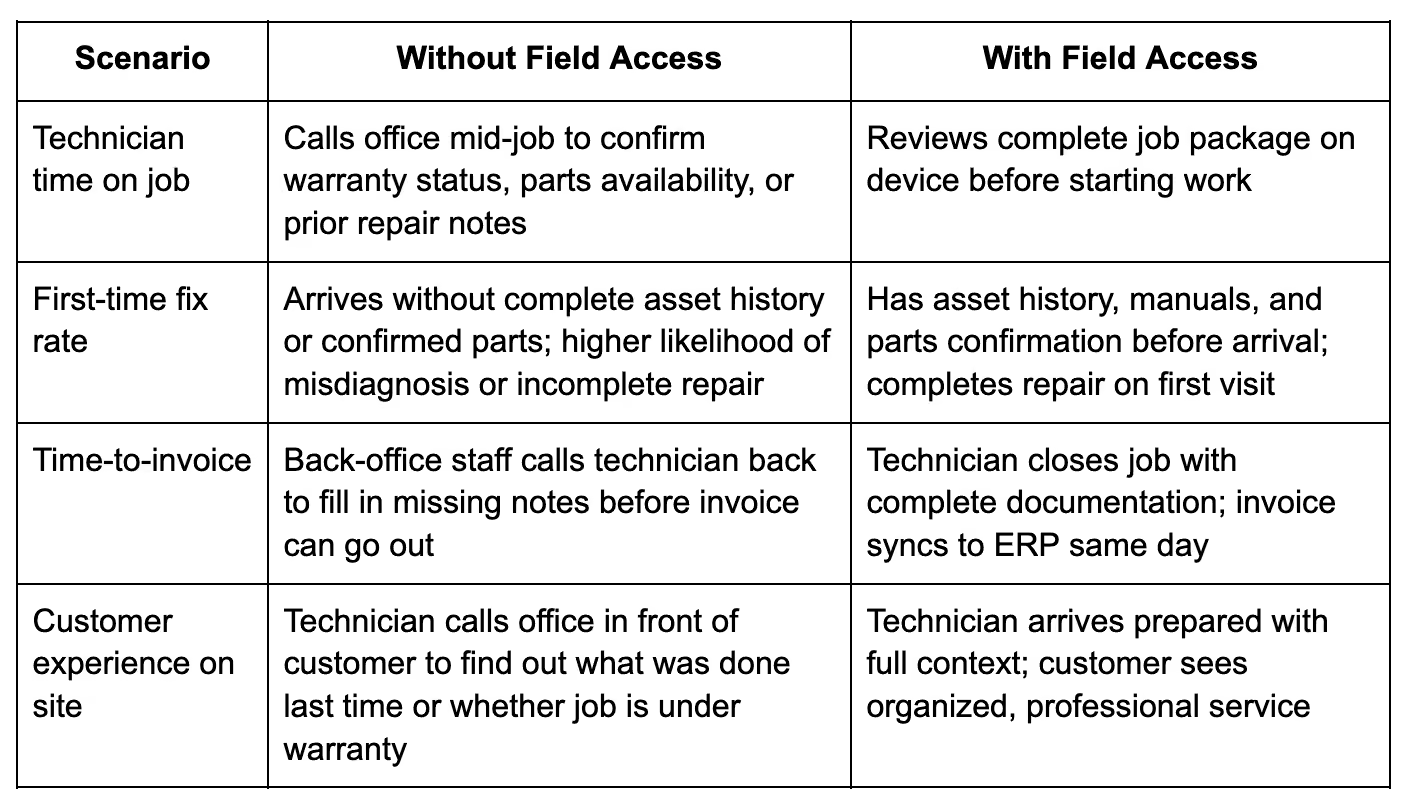
Your dispatcher is fielding calls from the field all day. Your senior technician, the one who has been with the company for 15 years and knows every piece of equipment in the territory, is answering questions instead of turning wrenches. Each call pulls two people off productive work at the same time, and the downstream costs show up in your first-time fix rate and invoice cycle.
How Calls Lower Technician Utilization
While a technician waits on the phone for a part number or warranty status, the equipment sits untouched. Incomplete work orders stall the job at the door. Dispatch or a more experienced colleague has to supply the asset history and coverage details first. The cost compounds once the tribal knowledge lives with one senior technician. Each interruption pulls that person off their own jobs. A single unanswered question turns into a scheduling bottleneck.
How Missing Information Hurts First-Time Fix Rate
The Service Council surveyed more than 1,850 field service technicians in 2022. Time spent looking for information ranked second only to paperwork among their least favorite tasks.
A quarter said their company doesn't make it easy to find what they need to resolve an issue or to know which parts a visit requires. Service manuals and spare parts visibility ranked among the top tools they wanted in the field. Without them, the job ends in a call to the office or a second truck roll.
How Incomplete Notes Slow Time-to-Invoice
A job with missing labor or parts details isn't ready to bill. The back office holds the invoice. Someone has to chase down the technician to complete the record.
One commercial HVAC service company ran on paper work orders and manual re-entry into its ERP. Billing a customer often took two weeks or more. After moving to Service Pro by MSI Data, integrated with its Viewpoint ERP, the company cut its time-to-invoice to under a week.
Incomplete documentation also leaks revenue. When labor or the correct payer never reaches the invoice, the work gets written off. Tag each held job by its cause, such as a missing field or an unresolved coverage question. The pattern shows which step costs the most.
How Customers Lose Confidence On Site
A technician calling the office in front of a customer to find out what was done last time signals disorganization, regardless of how good the repair turns out to be. Customers at commercial and industrial sites are paying for expertise, and a technician who arrives without context doesn’t project it.
What Information Should Technicians Have Before Arrival
Calls to the office are a symptom. Each one traces back to something the work order didn't include when the technician headed out. Check what your field teams receive against the sections below. Anything absent is generating calls.
Customer contacts and site access notes: Who to call on arrival, building access codes, hours of operation, permit requirements. This information is rarely in the work order and almost always lives in someone's email or memory. When it’s missing, the first call happens before the technician even starts the job.
Asset history, manuals, and prior work orders: The make, model, serial number, install date, and a complete list of prior repairs tied to that specific asset. Equipment manuals and technical documentation should be accessible on the same device, not stored in a binder back at the shop.
Parts availability and truck stock: Knowing what’s on the truck and what’s in the warehouse before leaving the shop prevents the mid-job call to check whether a part can be sourced same-day.
Contract, warranty, and billable status: Is this job covered under a service contract? Is the failed component still under manufacturer warranty? A wrong answer bills the customer for work they don't owe. The opposite mistake leaves revenue uncollected.
Safety steps and compliance checklists: For industrial equipment and commercial HVAC, safety protocols and inspection checklists aren’t optional. When these are paper-based or stored only in the office system, technicians either skip steps or call to confirm requirements, and both outcomes create compliance exposure.
How Can Field Service Software Cut Office Calls
Each cause above has a matching fix. Field service management (FSM) software exists to dispatch field work and track it to completion. Set up well, it puts job data in front of the technician at the equipment. Updates from the field flow back to the ERP without re-keying.
Offline Mobile Access for Dead Zones
Basements and equipment rooms often have no cell signal, which is exactly where field work happens. An offline-capable mobile app downloads relevant work orders and asset records to the device before the technician leaves coverage, then syncs completed records back to the system when the connection restores. A mobile app that requires a live connection results in failure at the job site.
Work Order Communication in One Record
Technician notes and photos belong in the work order. In personal phones and text threads, they leave with whoever sent them. Once every update lands in one record, the next technician assigned to that asset opens the work order and sees what the last visit found. The back office sees it too. Nobody has to call anyone to piece the job back together.
ERP Sync for Field and Back-Office Data
When the field service platform and the ERP sync in real time, technicians can check parts inventory and warranty status from their device without calling the office. The financial system of record stays where it is. Dispatch and asset history sit outside what an ERP was built to do. Field service software handles that work and passes the results back. Nothing gets ripped out.
Service Pro connects to Sage 100, NetSuite, Epicor Prophet 21, and Microsoft Dynamics Business Central through native integrations and a secure API. The ERP remains the system of record for financials. Service Pro handles the operational layer (work orders, scheduling, mobile access, asset tracking) and passes completed job data back to the ERP for invoicing and reporting, without manual re-entry.
AI Guidance Grounded in Service History
Service Pro delivers asset context and prior service notes to the technician before the job starts through a capability called Job Prep Brief. It’s grounded in the customer's own records (manuals, work orders, asset history, service contracts), rather than generic answers pulled from the internet. A technician on a job site can ask a question by voice or text and get an answer drawn from that specific asset's service history, the same answer the senior technician would have given from memory, without a phone call.
The AI layer sits on top of the platform's existing asset and service data. It works because the data is already structured and accessible in Service Pro. Service Pro also uses voice and images to support diagnostics and documentation, helping technicians close jobs faster with accurate records created automatically.
How Do You Roll This Out Without Slowing the Team
Retraining pulls technicians off billable work. Midyear, with the busy season underway, that cost is hard to justify. A phased rollout keeps the change small. Start with the information technicians already call the office for. The rest can wait until the team is comfortable.
Start with the Calls Techs Make Every Day
Before configuring anything, log the calls technicians are already making and what information they’re asking for. The categories of missing information (warranty status, parts, asset history, contract terms) tell you exactly which data fields need to be accessible in the mobile app first. If technicians are calling to confirm contract coverage on 30% of jobs, that’s the first workflow to digitize.
Keep Mobile Workflows Short
A mobile interface that mirrors the full desktop system won’t get used in the field. Technicians need the minimum required to start a job, close it, and capture what happened. Every required field added beyond that threshold lowers data quality because technicians fill them in fast and inaccurately just to move on.
Train Dispatch and Field Teams Together
If only one side learns the new system, the calls to the office continue. Dispatchers need to see what technicians see on their devices. Technicians need to know how dispatchers build the work order.
Track Calls, Repeat Visits, and Invoice Lag
Measure the problem before and after. Four indicators show whether the information gap is actually closing:
- Inbound call volume from the field
- Repeat truck roll rate to the same asset
- Days from job close to invoice sent
- First-time fix rate
Frequently Asked Questions
How Many Inbound Calls from Technicians Signal an Information Gap?
There isn’t a universal threshold, but if technicians are calling the office to answer questions that a complete work order should already contain (asset details, contract status, parts availability, warranty terms), the frequency of those calls is itself the signal. One or two calls per job per day across a team of 50 technicians adds up to hundreds of interruptions weekly, and hours of lost wrench time.
Can Field Service Mobile Apps Work Without a Cell Signal?
Yes, provided the app is built with offline capability. The app downloads relevant work orders and asset records to the device before the technician enters a low-signal area, then syncs completed records back to the system when the connection restores.
Does Field Service Software Replace the ERP?
No. A field service platform sits alongside the ERP and connects to it. The ERP remains the system of record for financials, and the field service platform handles the operational layer, passing data back to the ERP without manual re-entry.
What Metrics Show Whether Technicians Have the Right Information in the Field?
First-time fix rate, repeat truck roll rate, inbound call volume from the field, and days from job close to invoice sent are the four indicators to track. If first-time fix rate is rising and call volume is falling, the information gap is closing.
Can Field AI Answer Technician Questions Without a Call to the Office?
Service Pro responds to field questions using the customer's own manuals and service history. A newer tech on site gets the answer without waiting for a senior technician to call back. Tribal knowledge stops depending on who picks up the phone.
See what the wait between a finished job and a sent invoice is costing you.
Run the numbers