







The Best NetSuite FSM Alternative: Better Together in 2026

Already have NetSuite ingrained in your company and don’t want to switch, but need field service management expertise? There’s more options than NetSuite’s own Field Service Management platform.
NetSuite can stay as the system of record for finance and inventory. When assets and coverage rules get complex, the pressure lands on the field-service workflow that sits on top of it.
This guide covers what NetSuite FSM handles natively and when to run a dedicated field service platform alongside it.
What Is NetSuite FSM
NetSuite Field Service Management is NetSuite's native field-service application. It evolved from NextService after Oracle NetSuite acquired Next Technik in 2023. Because it runs inside NetSuite, the records it uses need no separate FSM-to-ERP integration.
- Scheduling and dispatch. Drag-and-drop scheduling with assignment by skills and location.
- Work-order management. Work can originate from cases or preventive-maintenance schedules.
- Mobile technician workflow. Technicians see job and asset history in the field. They can log parts used and capture signatures on site.
- Asset management. Maintenance history and warranty information live on NetSuite asset records.
- Inventory and billing. Field parts consumption posts against inventory records. Completed service activity flows into NetSuite billing.
Why Look for a NetSuite FSM Alternative
Your dispatcher is cross-referencing spreadsheets and calling technicians to figure out who has the right certifications and is closest to the job. That friction persists even with NetSuite.
Plus, there are FSM platforms out there that offer different dashboards, configurations, and functionality that work seamlessly with NetSuite. Why not take a look?
When Is Native NetSuite FSM Enough
NetSuite FSM is enough when its native workflows, from scheduling through billing, match how your service team operates. Because it runs on NetSuite records, field activity flows to the back office without a separate FSM-to-ERP integration layer. Team size and asset complexity don't settle the decision on their own. Test NetSuite FSM's standard workflow and mobile experience against your multi-day jobs and coverage rules.
Where Do Asset-Centric Teams Hit Friction
Organizations managing generators or commercial refrigeration units need asset-level service history and warranty coverage available in the field. NetSuite FSM supports equipment and service records. Test whether its data model and mobile workflow can represent the asset relationships and coverage rules your operation requires.
Coverage checks are a separate evaluation. If your team determines eligibility before dispatch, find where coverage information appears in the work-order workflow. Confirm whether it stops uncovered work from proceeding or records warranty information after the fact.
NetSuite's Warranty and Repairs Management is a separate SuiteApp for warranty registration and claims processing. Its registration covers inventory and assembly items only. The SuiteApp also assumes each sales order has one corresponding invoice. Under a billing schedule with multiple invoices, the same item can be registered more than once. Oracle's documentation notes that no validation currently exists for that case.
NetSuite offers asset and warranty features. For complex service operations, test whether the configured workflow puts asset and coverage context in front of the dispatcher and technician before work begins. Then check whether completed work becomes invoice-ready financial data without an exception queue.
What Does Implementation Timing Actually Look Like
Because Service Pro FSM sits alongside NetSuite rather than reconfiguring it, a rollout doesn't touch financials, inventory, or the general ledger. The blast radius is contained to the field service layer, which is a materially smaller lift than any project that touches the ERP core.
What Does "Better Together" Mean for NetSuite and Service Pro
NetSuite remains the system of record for customers, financials, and inventory. Service Pro FSM runs the field service lifecycle on top of it, and syncs completed job data back to NetSuite for invoicing and reporting.
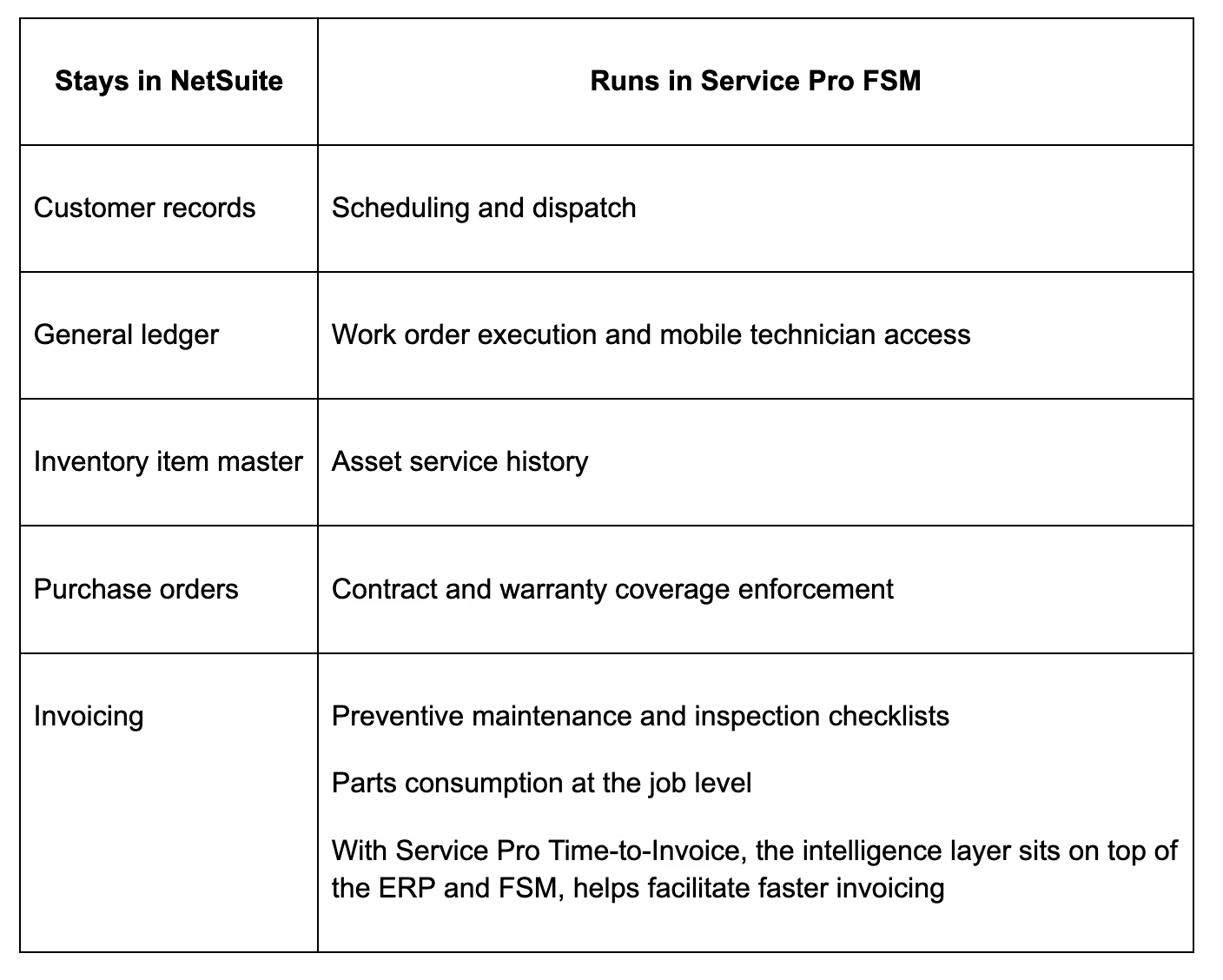
Service Pro FSM reads from NetSuite records and writes back to them. It has native connections to NetSuite, Sage 100, Epicor Prophet 21, and Microsoft Dynamics Business Central, plus a secure API for other systems. When a technician closes a job, the billing record syncs to NetSuite the same day. Inventory consumed in the field decrements against the NetSuite item master, with no CSV export or manual reconciliation.
How Does Service Pro FSM Compare with NetSuite Field Service Management
NetSuite FSM and Service Pro FSM overlap on basic capabilities. The difference is depth, specifically for organizations where the asset is the center of the service relationship.

Schedule Board and Dispatch
NetSuite FSM includes a drag-and-drop Schedule Board with skills- and location-based assignment. Dispatchers can also filter by region and match jobs to equipment. For asset-centric teams, test whether the configured dispatch workflow accounts for current certifications and contract coverage on every job. Hold Service Pro to the same test against your real dispatch workflow.
Offline Mobile Technician Access
NetSuite FSM supports offline work within documented limits. The FSM Mobile app is a progressive web app. Oracle states that technicians working offline can't use remote tabs or fields that send requests to NetSuite.
Oracle instructs technicians to reconnect and let offline changes sync before refreshing the app. If the app refreshes before synchronization finishes, unsynced data can be lost. Oracle's current release notes reference pending-sync indicators and warnings built to head off that scenario.
For asset-centric teams at remote sites or industrial plants, run one real job offline, from opening the work order and asset record through photos and signatures. Confirm the completed job syncs once connectivity returns.
Service Pro Mobile is a native app for iOS, Android, and Windows that works offline. Technicians can complete work orders and capture customer signatures with no connection. Data syncs to Service Pro FSM and the connected ERP when service returns.
Asset History and Preventive Maintenance
NetSuite FSM defines an FSM Asset as a custom record that can be organized in a parent-child hierarchy. In FSM Mobile, the History tab displays completed tasks for the current asset. Oracle's documentation shows a "History Data Download" indicator while the app loads historical task data for that asset. If your technicians work in low-connectivity locations, test the history workflow offline. Prior tasks and attachments have to be on the device before the signal drops.
Service Pro FSM centers service work on the asset. Its asset-management workflow tracks equipment from sale and in-service date through repair. Preventive maintenance work orders generate automatically from service intervals. Technicians can view service history and inventory field data with or without a connection.
Contract and Warranty Coverage Enforcement
Coverage enforcement at work-order intake determines whether a job is billable, covered by a service contract, or eligible for warranty before dispatch. The service team can then apply the right terms and capture the required documentation up front. Eligibility has to surface before work begins. A coverage issue the back office finds after labor and parts are spent becomes unrecoverable work or a billing error.
Service Pro FSM shows warranty and contract coverage at work-order intake. The team picks the billing path before the truck rolls.
Parts Tracking and Same-Day Invoice Sync
Service Pro FSM can pass technician-recorded labor, parts, and work-order closeout data to NetSuite, reducing the manual reconciliation work that can delay invoicing. The exact timing of inventory updates and invoice creation depends on the customer’s NetSuite configuration and billing workflow.
Service Profitability Dashboards
Service Pro FSM provides real-time reporting on gross margin by technician, contract, asset type, or region, replacing the Tuesday-morning batch ERP report with daily visibility into profitability. This is the reporting gap that brings the controller or FP&A director into the buying conversation.
Who Is Service Pro FSM Built For
Service Pro FSM is purpose-built for asset-centric field service organizations with 25 or more field technicians managing large physical equipment.
Power and Energy Service Teams
Generators, turbines, solar arrays, power generation systems. The service complexity includes compliance documentation, multi-site asset tracking, warranty coverage on high-value equipment, and parts traceability where downtime is measured in lost revenue per hour.
Industrial Equipment Service Teams
Cranes and industrial machinery create a different kind of service complexity. Dispatch depends on technician certifications and deep asset history. When downtime is expensive, the pressure is on to resolve the issue on the first visit. First-time fix rate measures the share of jobs resolved without a return visit. Each callback adds another truck roll and more downtime for the customer.
Heavy Equipment
Excavators, bulldozers, wheel loaders, haul trucks. When one of these machines breaks down on a construction or mining site, the technician has to fix it with whatever parts are on the truck. Manufacturer warranty claims on major components require engine-hour readings and maintenance records. Missing paperwork turns a covered repair into a cost the service team absorbs.

How Should You Evaluate a NetSuite FSM Alternative
Before evaluating any FSM alternative, document which data lives in NetSuite and which data would live in the FSM platform. Any alternative that blurs the boundary between ERP data and FSM data creates a data governance problem your IT lead will catch before you do.
Map ERP Data Ownership First
The IT lead or ops director who owns the ERP relationship asks where the FSM platform is "master" of data versus where NetSuite is. The answer needs to be clear before any evaluation moves forward:
- NetSuite owns: Customer records, the general ledger, inventory item master, purchase orders, and invoicing
- Service Pro owns: Scheduling, work order execution, asset service history, contract and warranty coverage, and parts consumption at the job level
Score Technician Adoption Before Go-Live
Two adoption questions matter before committing to a full rollout: Does the mobile app work offline in the environments where your technicians actually work? And can a technician complete a full job cycle (open, execute, close, capture signature) in the app without calling the dispatcher for help? Pilot with one crew first. Retraining cost and timing is the single most common hesitation in FSM evaluations.
Calculate Time-to-Invoice Before and After
Pull your current average days between job close and invoice sent, then ask whether the FSM alternative syncs that billing record to NetSuite the same day the technician closes the job or requires a back-office step.
Pilot One Region Before Full Rollout
One territory or service line first, with a defined go-live date and a small number of technicians, surfaces form design problems, integration gaps, training gaps, and workflow mismatches at a scale where they are cheap to fix. A big-bang rollout across all technicians on day one is the most common cause of failed FSM implementations.
Frequently Asked Questions
Does Service Pro FSM Replace NetSuite ERP?
Service Pro FSM doesn't replace NetSuite. NetSuite remains the system of record for customers, financials, and inventory while Service Pro handles the field service lifecycle and syncs completed job data back to NetSuite the same day.
Which ERP Systems Does Service Pro Integrate With?
Service Pro FSM has native connections to NetSuite, Sage 100, Epicor Prophet 21, and Microsoft Dynamics Business Central, plus a secure API for other systems.
Can Service Pro Technicians Work Without Cell Service?
Yes. The Service Pro mobile app is fully offline-capable, so technicians can open jobs, complete checklists, log parts, and capture signatures in basements, remote sites, industrial plants, or underground facilities without a connection, and the data syncs when connectivity returns.
What Metrics Should Teams Track After Go-Live?
Track first-time fix rate, average days from job close to invoice sent, technician utilization, and warranty write-offs per period. These four numbers tell you whether the integration between Service Pro FSM and NetSuite is working as intended.
When Should an Organization Use NetSuite FSM Instead of a Dedicated FSM Platform?
NetSuite FSM is a practical fit for organizations with smaller field teams that primarily need scheduling connected to NetSuite billing and do not manage complex physical assets with deep service histories or high-volume preventive maintenance programs.
See Service Pro FSM and NetSuite Working Together
Service Pro by MSI Data has been a NetSuite partner since 2014, with a native, bidirectional integration built for field service organizations in the power, industrial equipment, and heavy equipment industries. Schedule a demo to see how the integration works with your NetSuite account and your asset data.
See what the wait between a finished job and a sent invoice is costing you.
Run the numbers