








The Hidden Cost of Paper Work Orders in Enterprise Field Service
You'd expect a 100-technician operation running NetSuite or Business Central to handle work orders digitally from start to finish. In the back office, it does. Out in the field, the work order still lives on a clipboard.
No system connects the two. The dispatcher calls techs to get job status. Someone in the office deciphers handwriting before an invoice can go out. Paper hangs on for reasons that make sense at the time. Its cost shows up later, in slower billing and missed reimbursements.
Is It Normal for Enterprise Field Service Companies to Use Paper Work Orders?
Paper work orders are still in use at mid-market service operations running 50 or more technicians and managing large physical assets like industrial equipment and power generation systems. Across 25 sales calls reviewed by the Service Pro by MSI Data team, paper came up in 4 demos. Spreadsheets or Excel appeared in 8. Those two outnumbered every named software competitor.
The reasons paper holds on differ by industry:
- Power generation and energy services: Remote job sites with limited connectivity make paper feel like the safer fallback when a mobile app requires a live server connection to function.
- Industrial equipment and manufacturing: Long-tenured technicians trained on paper workflows resist change without a clear operational reason to switch, and most haven't been given one.
- Commercial HVAC and refrigeration: High job volume and fast turnaround create pressure to default to whatever is fastest in the moment.
- Construction and heavy equipment: Field teams working across multiple sites without reliable connectivity depend on paper when digital tools fail offline.
Why Do Paper Work Orders Survive at Enterprise Scale?
Crawlspaces and remote generator sites don't always have a signal. A mobile tool that needs a server connection for each step stalls there. Paper keeps working.
Many operations run Sage, NetSuite, Epicor, or Business Central for financials with nothing connecting that system to the field. Field service management (FSM) software is built for that role. It handles work orders and dispatch and sends completed job data to the ERP. Without it, technicians fill out paper and someone in the office re-keys the data by hand.
Replacing paper means retraining 50 or 100 technicians. Service managers who have lived through a bad rollout won't start another one midyear. A stalled implementation leaves the field worse off than the clipboard did.
Where Do Paper Work Orders Cost the Most?
Paper work orders create specific, measurable costs in five operational areas. These costs show up directly in critical metrics you measure time-to-invoice, first-time fix rate, warranty recovery, technician utilization, and compliance exposure.
Time-to-Invoice
The back-office staffer reconciling a technician's incomplete notes before an invoice can go out, sometimes calling the tech back to fill in the gaps, is a daily reality in paper-based operations. Paper makes it worse, because every handoff in the chain below is a point where time is lost, and errors are introduced:
- Technician completes the job and fills out a paper work order on-site
- Work order travels back to the office at end of day, or the next day
- Back-office staff deciphers handwriting and fills in missing fields
- Data is manually re-entered into the ERP
- Invoice is generated and sent
First-Time Fix Rate
First-time fix rate measures the share of service calls resolved without a return visit. A technician missing the asset's history or the right part has to come back. A callback means a second truck roll and a longer wait for the customer. If a return visit goes on a fresh paper work order, nothing ties it to the earlier job, and the original ticket still reads as closed. First-time fix rate ends up overstated.
Warranty and Contract Revenue
Warranty and contract claims depend on complete job records. On paper, labor and parts details reach the office after the job, in handwriting someone has to decode. Any detail that doesn't make it onto the form is work the team can't claim.
Technician Utilization
The dispatcher cross-referencing spreadsheets and making phone calls to figure out who has the right skills and is closest to the job, described by one operations lead as "Tetris-like," is what scheduling looks like without digital work order data. Without it, service managers can't see which technicians are underbooked or overloaded.
Compliance and Inspection Records
For power generation and commercial refrigeration operations, paper inspection records create audit risk. If a regulator or customer asks for documentation of a service visit from six months ago, a paper-based operation has to physically locate the form. Digital inspection records are searchable and timestamped, producing an audit trail on demand.
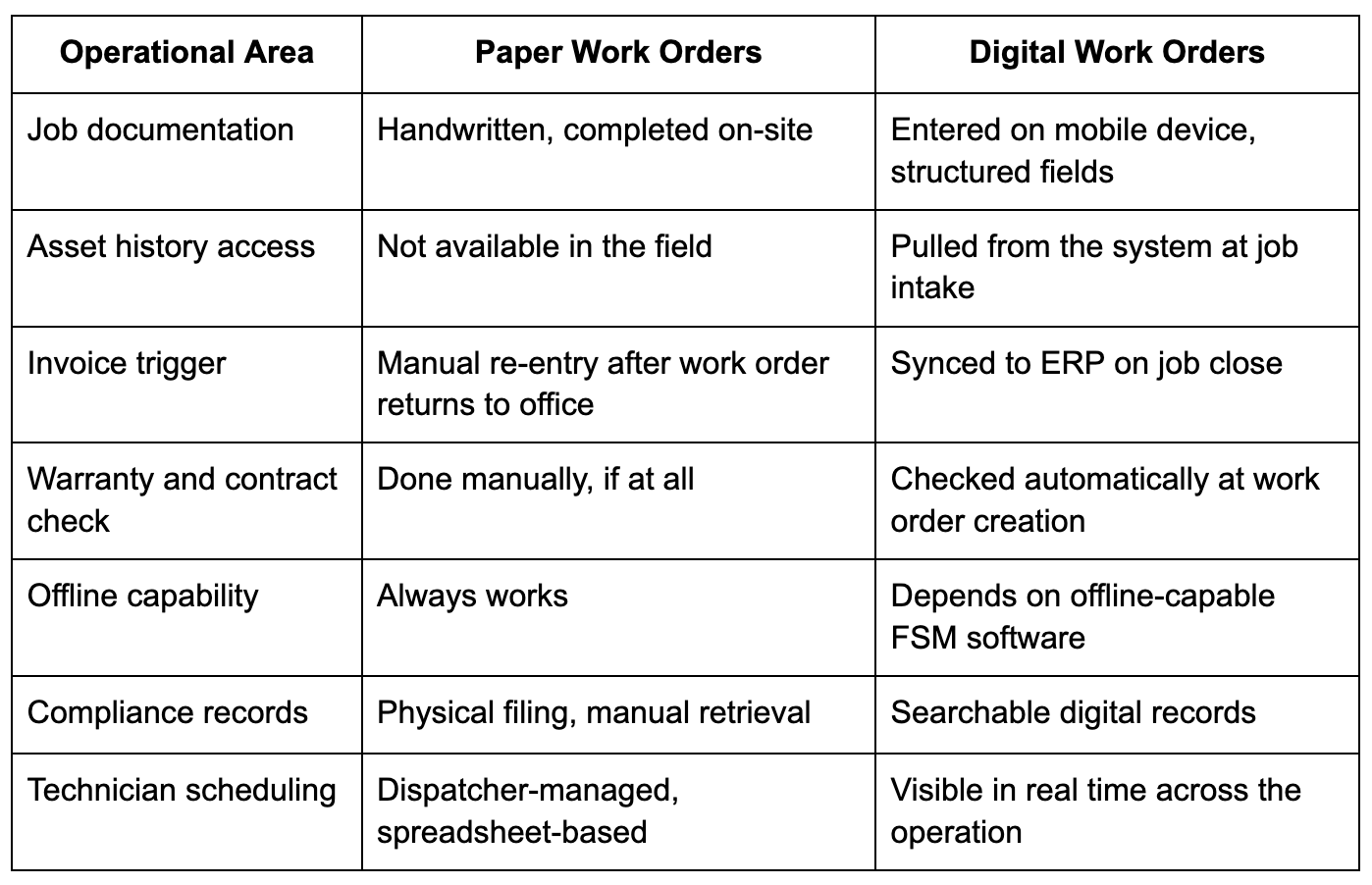
Paper Work Orders vs. Digital Work Orders at a Glance
When Should You Move Off Paper Work Orders?
During the day, status is guesswork until someone calls. A service manager who has to phone a technician to learn whether a job is done has no live view of the day. Mobile work orders show that status without the call.
A technician sent back to the same crane starts from scratch. Its service history sits in a filing cabinet or in one veteran's head. When he retires, that knowledge retires with him.
Once the job closes, the form still has to reach the office. It comes in days late, or missing details, from the bottom of a truck cab. Someone in the office types serial numbers and labor hours off a sheet the technician already filled out. The invoice waits until that's done. A half-filled form also leaves room to dispute what work was performed.
An operation seeing these signs has outgrown paper.
What Should Replace Paper Work Orders?
The capability picture comes first, then the platform that delivers it.
Offline Mobile Work Orders
Remote generator sites and basements don't always have a signal. A technician working there needs a work order that saves on the device and syncs once the connection returns. If the app only lets a tech view the job offline, notes go back on paper and someone types them up later.
Asset and Service History at the Job Site
When a technician opens a work order on a mobile device, they should see the asset's full service history, prior notes, installed parts, and warranty status before they touch anything. Service Pro's asset-centric approach pulls this information from the system at job intake and delivers it to the technician's mobile device, even when they are offline. This is what closes the gap between a 70% and an 88% first-time fix rate.
Required Fields and Digital Checklists
Digital work orders can enforce required fields before a job is marked complete. A technician can't close a work order without logging the parts used and the customer signature, which eliminates the back-office reconciliation step that delays invoicing.
ERP Integration Without an ERP Replacement
The most common fear in this transition is that going digital means replacing the ERP. A field service management platform sits between the field and the ERP, passing structured data in both directions, so neither system gets replaced. Service Pro has native integrations with Sage 100, NetSuite, Epicor Prophet 21, and Microsoft Dynamics Business Central.
Contract and Warranty Coverage Enforcement
When a work order is created digitally, the system checks whether the asset or customer has active warranty or contract coverage before a technician is dispatched. Service Pro's contract and warranty coverage enforcement flags jobs that should be billed to a manufacturer warranty or covered under a service contract at work order intake, before the work is done for free.
Start With One High-Volume Workflow
Service organizations that move off paper successfully often start with one workflow: preventive maintenance routes or inspection checklists. Once technicians see that the mobile app works offline and doesn’t add steps, adoption follows.
Frequently Asked Questions
Can Paper Work Orders Still Work for Small Field Service Teams?
Yes, paper can work for very small operations with low job volume and a single office location. The costs described in this article compound with scale, so a team of 5 technicians faces a different level of exposure than a team of 50.
How Do You Calculate the True Cost of Paper Work Orders?
Add up the labor hours spent on manual data re-entry and any warranty or contract work that was absorbed rather than billed. Those numbers, multiplied by job volume, give a rough baseline.
Do Digital Work Orders Require Cell Service in the Field?
No. Offline-capable field service management platforms allow technicians to complete and submit work orders without an active connection, syncing data when connectivity is restored. The difference is between a true offline-first mobile app and a progressive web app that requires server requests for every interaction.
Should Work Order Data Live in the FSM Platform or the ERP?
Work order execution belongs in the FSM platform, which is built for field workflows, while financial records belong in the ERP. The two systems stay in sync through a native integration, so neither team works from stale data.
How Do You Get Technicians to Adopt Digital Work Orders?
Start with a workflow that removes a step. When technicians see that a digital work order pre-fills the asset information they would otherwise have to write by hand, resistance drops faster than any training program produces.
What Is the First Work Order Workflow to Digitize?
Preventive maintenance routes and high-volume inspection checklists are the most common starting points because they are repetitive and easy to template, making the digital version faster than the paper version from day one.
See what the wait between a finished job and a sent invoice is costing you.
Run the numbers