

It All Comes Back to Time-to-Invoice
Over the past several months, we’ve launched several new features, including Job Prep Brief and Invoice Ready Notes in Service Pro AI. Each one solved a real problem we heard directly from customers.
However, all these features together directly improve a key business metric – time it takes to invoice clients for field work. In one mid-sized dealer’s operation, producing a single service invoice costs roughly $83, and only about $6 of that is creating the invoice. The rest is rework, chasing technicians for missing information, reconciling across systems, and interest on completed work sitting unbilled. This is why adding another person to the billing desk doesn’t move the number – roughly 90% of the delay is waiting on information, not waiting on a person.
TTI is a multi-faceted problem spanning field operations and billing departments and Field Service Management (FSM) and Enterprise Resource Planning (ERP) systems. In this article, we will explore how existing Service Pro AI features help our customers reduce Time to Invoice and recover more field service revenue.
Let’s get into it.
Layers of Intelligence
Service Pro AI’s capabilities align to three layers, each one addressing a different part of the time-to-invoice lifecycle:
- Field Execution: everything techs need to execute the job right, the first time. This layer covers what happens before a tech arrives and while they’re still on-site, from making sure they show up prepared to ensuring the right information gets captured on the job.
- Revenue Readiness: moving into the back office, this layer takes what happened in the field and turns it into something that can actually move to invoice, without someone manually piecing together notes, photos, and conversation history after the fact.
- Ops Intelligence: improving the time-to-invoice pipeline as a whole. Rather than focusing on any single job, this layer gives you visibility across every job in progress, so you can see where things are stuck and catch revenue that would otherwise slip through the cracks.
Every layer already has something behind it. Here’s what’s live now, and what’s next.
Field Execution
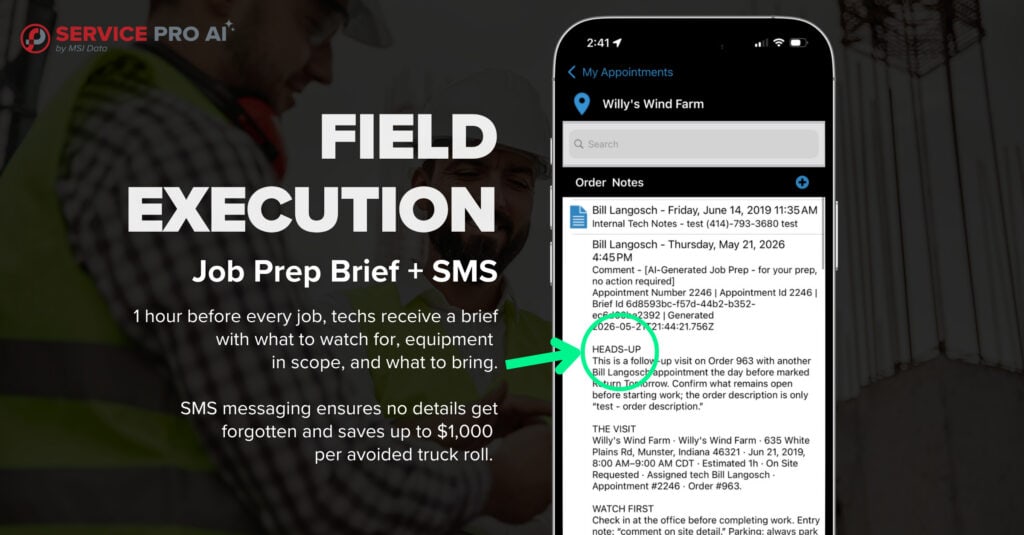
Field Execution is about setting the technician up to succeed before they ever knock on a customer’s door, and making sure nothing gets missed or forgotten on site.
Job Prep Brief automatically pulls together everything the tech needs to know before they arrive at the job site, including:
- Service history from the last five work orders
- Site notes and customer notes
- Equipment details
- Warranty and contract coverage
- Open issues or anomalies, like a warranty that lapsed mid-contract or an appointment that’s been sitting open since 2019
Each brief is generated automatically an hour before the scheduled appointment, so the tech shows up with the right context and, just as important, the right parts already on the truck. That’s the difference between a job that gets fixed on the first visit and one that turns into a second truck roll, which can run anywhere from $175 to over $1,000 depending on the job.
Customers who’ve had a hand in shaping this feature have said as much themselves. Shawn Tackett, Director of Houston Field Services at Relevant Solutions, shared how he is building out his knowledge base in Service Pro AI specifically so techs can access the right information before and during a job, not just after.
Excited about the road to results, Shawn says, “The work we’re putting in now is going to benefit us later.”
Hear Shawn’s story here in his customer spotlight.
SMS Capture, coming soon, helps ensure that all information (photos, serial numbers, etc) are collected while the tech is still on-site. Service Pro AI will text the technician directly during the appointment to make sure:
- Everything the back office needs to build a clean invoice gets captured before the truck pulls away
- Everything compliance needs to file a warranty claim is on record, including serial numbers and photos
SMS messaging keeps critical details top of mind for technicians while they’re still in the field. No one wants a second visit just to get a photo of the equipment serial number. Plus, no more end-of-day scramble to remember details.
This feature is actively being validated with a select group of users. To join the pilot, start your free trial of Service Pro AI today, or if you’re already in the trial, ask your Strategic Account Manager for more information.
Revenue Readiness
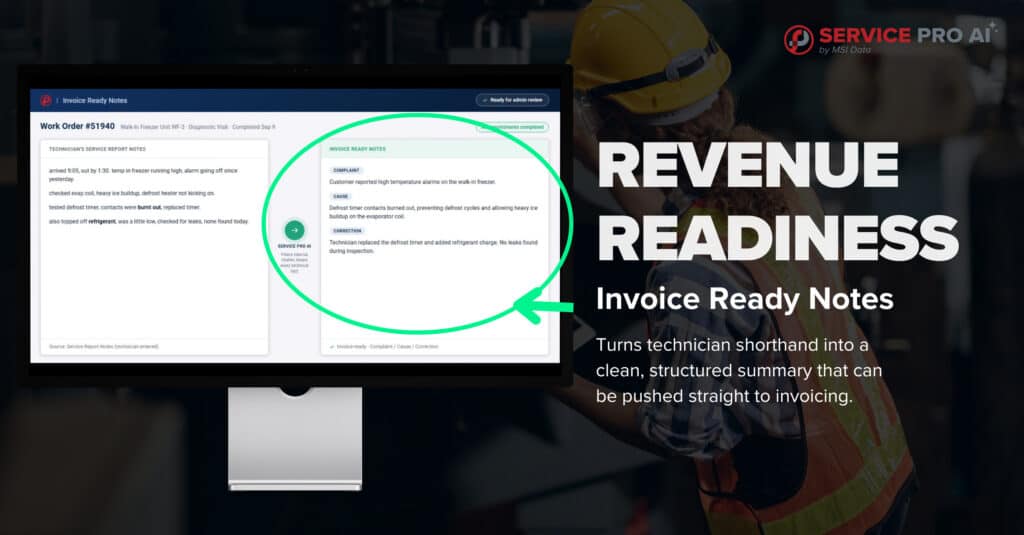
Revenue Readiness picks up where Field Execution leaves off: turning what happened in the field into something the back office can actually invoice against, without anyone having to piece it together manually.
Invoice Ready Notes takes what a technician captured on-site, whether that’s a voice note, typed shorthand, or a mix of both, and turns it into a clean, structured summary the back office can use to move straight to invoicing. Early results have seen up to 82% of AI-generated notes shipping to invoice unchanged or with a light edit. It’s especially useful for the parts of a work order that used to require the most back-and-forth:
- Pulling together the full narrative of what happened on the job
- Compiling the conversation history between tech and customer
- Attaching any photos to one record tied to the work order
Garrett Jobgen, General Manager of J4 Commercial Services, talked through how connecting Service Pro AI to the tools his team already uses, including the AI Connector, has changed what his back office can see day to day. “It was just a no brainer how much time it was saving. It kind of paid for itself.” says Garrett.
See Garret’s fireside chat here.
Ops Intelligence
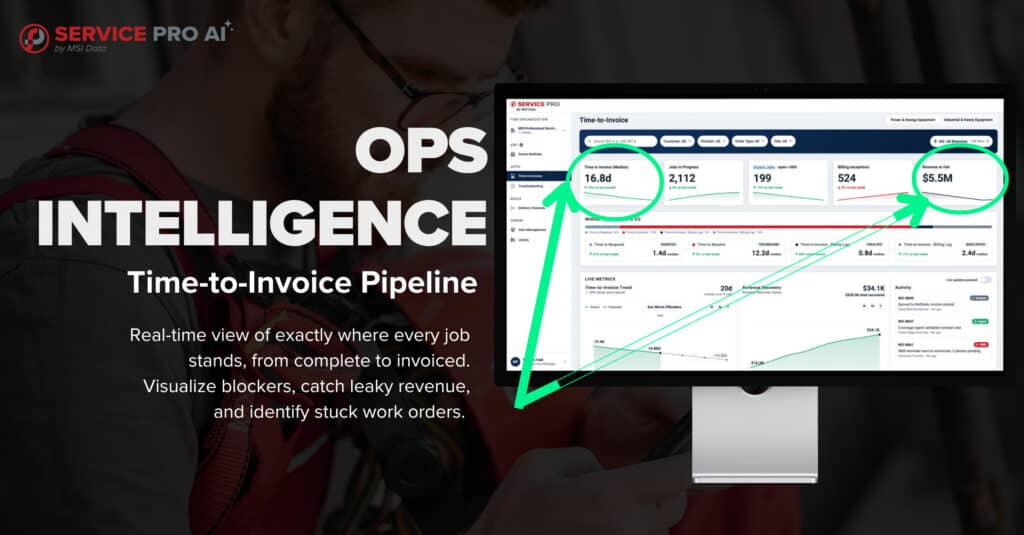
Ops Intelligence is less about any single job and more about the pipeline as a whole.
Full time-to-invoice pipeline visibility gives you a real-time view of exactly where every job stands, from complete to invoiced, so you can:
- See blockers as they happen instead of discovering them weeks later
- Catch what we call leaky revenue: the small jobs that never get invoiced at all because no one on the back office team had the bandwidth to notice they were sitting there
- Move past guessing which work orders are actually stuck and which ones just haven’t been updated yet
For teams that have felt the frustration of watching a job’s status update inconsistently, this is the layer built to answer that.
Early trial data suggests this kind of visibility adds up:
- One avoided callback per technician per month
- Up to 82% of AI-generated notes shipping to invoice unchanged or with a light edit
These numbers are directional, based on early adopter trial data, and will vary by fleet size and service mix, but these early results are only the beginning.
Start Your Free Trial of Service Pro AI
Your time-to-invoice cycle shouldn’t depend on how much bandwidth your back office has that week.
The Service Pro AI free trial is built to get your team to real results, not just a login. Here’s what you can expect:
- 30 days, completely free — no lengthy procurement process, just a few clicks to get started
- A dedicated Forward Deployed Engineer from day one — they’ll help configure Service Pro AI around your workflows, build out your knowledge base, and coach your technicians through real working conditions
- Features ready to use immediately — like Job Prep Brief and Invoice Ready Notes, so you don’t need a fully built system before seeing value
- Your data stays yours — Service Pro AI is a closed system, so what you upload isn’t shared publicly or used to train models for other companies
- A direct hand in what’s next — feedback from trial customers has already shaped features like Job Prep Brief, and joining now means shaping what SMS Capture and Pipeline Visibility look like as they roll out
If you’re already a Service Pro customer and would like to join the trial, reach out to your account manager to learn more. If you’re new to Service Pro, there’s no better time to see what these layers can do for your team.
Start Your Free Trial of Service Pro AI
Frequently Asked Questions
What is time-to-invoice?
Time-to-invoice is the time it takes from the moment a job is completed to the moment a clean invoice goes out. Service Pro AI is built to shorten that cycle across field execution, back-office processing, and pipeline visibility.
How do I get access to these features?
If you’re an existing Service Pro customer, reach out to your account manager to get Job Prep Brief and Invoice Ready Notes enabled, and to learn about early access to SMS Capture and Pipeline Visibility when they launch. If you’re new to Service Pro, the best way in is the free trial, which comes with a dedicated Forward Deployed Engineer from day one.
Do I need to have Job Prep Brief and Invoice Ready Notes both enabled to use other Service Pro AI features ?
No, but they work best together. Job Prep Brief gets a tech to the job prepared, Invoice Ready Notes turns what happens on that job into a clean invoice record, and SMS Capture and Pipeline Visibility extend that same lifecycle further into the field and into the back office’s view of the whole pipeline.
What kind of results have early adopters seen?
Early trial data points to meaningful gains, including fewer repeat callbacks per technician and a high percentage of invoices being sent out without any edits. These figures are directional and will vary by fleet size and service mix.