







Can AI Reduce Time-to-Invoice for Field Service Companies?
A job can be completed in the field and still be days away from an invoice. Technicians close out work without complete notes. Labor and parts wait on approval. Contract and warranty checks happen after the fact. Someone re-keys billing data into the ERP and hopes the serial number is right.
This article breaks down where the delay lives and how Service Pro by MSI Data gets invoices moving the same day the job closes.
Why Do Field Service Invoices Stall?
AI reduces time-to-invoice by removing the manual steps between job close and billing. The delay builds wherever the record reaching the back office is incomplete, unverified, or waiting to be re-keyed into the ERP.
Missing or Incomplete Technician Notes
A technician closes a job without capturing labor time, parts used, or asset details. A back-office staffer calls the tech back to fill in the gaps, sometimes days later. The documentation workflow was designed for paper and never rebuilt for digital, so the delay is baked in.
Unchecked Contract and Warranty Coverage
Rate and billable scope on asset-centric jobs depend on whether the work falls under a service contract or warranty. When nobody verifies coverage until close-out, invoices get held for revision or never billed at all. Waukesha-Pearce Industries (WPI) recovered seven figures in warranty claims in under a year after moving to Service Pro. Labor and parts data now reaches the back office the same day the technician logs it.
Manual Re-Entry Between Field Systems and the ERP
Most mid-market field service operations run a separate field service system and an ERP, with billing data re-keyed between them. Buyers describe this as living in "an island of automation," manually transferring serial numbers, contract dates, and billing data. One typo in a serial number can hold an invoice for days.
Where Does AI Shorten the Invoice Cycle?
Your billing queue is only as clean as what comes out of the field. AI addresses each of the causes above by removing the rework loops that keep invoices stuck in draft.
Automated Job Closeout Documentation
AI generates structured job summaries from technician voice input and photos at the point of job close. Service Pro uses voice and images to create structured service summaries automatically, so the invoice record is built while the technician is still on site. What arrives in the billing queue is a complete record ready for invoicing.
Job closeout summaries
An invoice built on thin technician notes waits until someone in the back office reaches the tech to fill in the details. AI moves that step to the job site. The technician talks through the work and adds photos. The AI turns that input into a complete summary at close-out.
Service Pro handles this today. Technicians request the summary when the job wraps, and it uploads directly to Service Pro. MSI Data puts the drop in documentation time at up to 50%. The back office starts from a complete record.
Invoice-Ready Notes
Once job documentation is complete and coverage is checked, Invoice-Ready Notes uses AI to generate the record the same day the job closes. The record is created and ready for review before a human approves it for delivery to the customer. The complete AI-generated record includes:
- Labor hours: Captured from technician input at closeout
- Parts used: Pulled from inventory transactions or manual entry
- Asset details: Serial number, model, install date, and service history
- Contract or warranty status: Pre-validated at intake
Direct ERP Sync Without Manual Re-Entry
AI-generated invoice records sync directly to the ERP without a back-office staffer re-keying the data. Service Pro connects natively to Sage 100, NetSuite, Epicor Kinetic, Epicor Prophet 21, and Microsoft Dynamics Business Central. The ERP stays the system of record. The AI handles the data movement.
What Metrics Show Whether AI Is Reducing Invoice Time?
Baseline these numbers before rolling anything out. The before figure makes the improvement visible to leadership.
Time-to-Invoice
Time-to-invoice is the number of days between job close and invoice delivery to the customer. Pull the last 90 days of closed work orders and compare close date to invoice date. Reference customers were seeing 16 or more days.
Invoice Exception Rate
Invoice exception rate is the percentage of invoices that require manual correction, hold, or revision before they can be sent. A high exception rate signals that documentation or coverage checks are failing upstream. AI addresses the root cause, not the symptom.
Warranty and Contract Revenue Recovery
Warranty and contract revenue recovery is the value of covered work billed to the correct payer at the contracted rate. Anything that misses gets written off or undercharged. Recovery depends on complete field documentation and accurate coverage information. Supporting records for labor and parts also have to reach the payer before the billing window closes.
Days Sales Outstanding
Days sales outstanding (DSO) is the average number of days between invoice delivery and payment receipt. Faster, more accurate invoices can support lower DSO by getting a complete invoice to the customer sooner and reducing avoidable disputes, clarification requests, and credit holds.
What Needs to Be in Place Before AI Can Work?
AI speeds up a working process. Pointed at a broken one, it produces bad invoices faster. Check the foundations below when evaluating any vendor.
Clean Work Order Data
If work orders are incomplete or missing required fields, the AI output reflects those gaps. Audit required closeout fields and enforce them before turning on AI-assisted invoicing. Buyers on sales calls were still running on spreadsheets and paper in many cases. Digitize the work order first.
Mobile Field Access
AI-assisted documentation requires technicians to have a mobile device with the field service app at the point of work. Offline capability matters in industrial and power-generation environments where connectivity is unreliable. Service Pro's mobile app is offline-capable.
ERP Integration Configuration
AI can't shorten time-to-invoice if completed work waits on the ERP. The connection between the two systems needs to be configured and tested before rollout. A nightly batch adds up to a day to every invoice. Ask whether data syncs in real time or on a schedule, and who controls that schedule.
Human Review Thresholds
AI-generated invoice records should route to a human reviewer before going to the customer, particularly for high-value jobs, complex multi-asset work orders, or any job where coverage was flagged as ambiguous. Set a dollar threshold above which every invoice gets a human look. The AI handles volume. The reviewer handles edge cases.
How Does Service Pro Compress Time-to-Invoice?
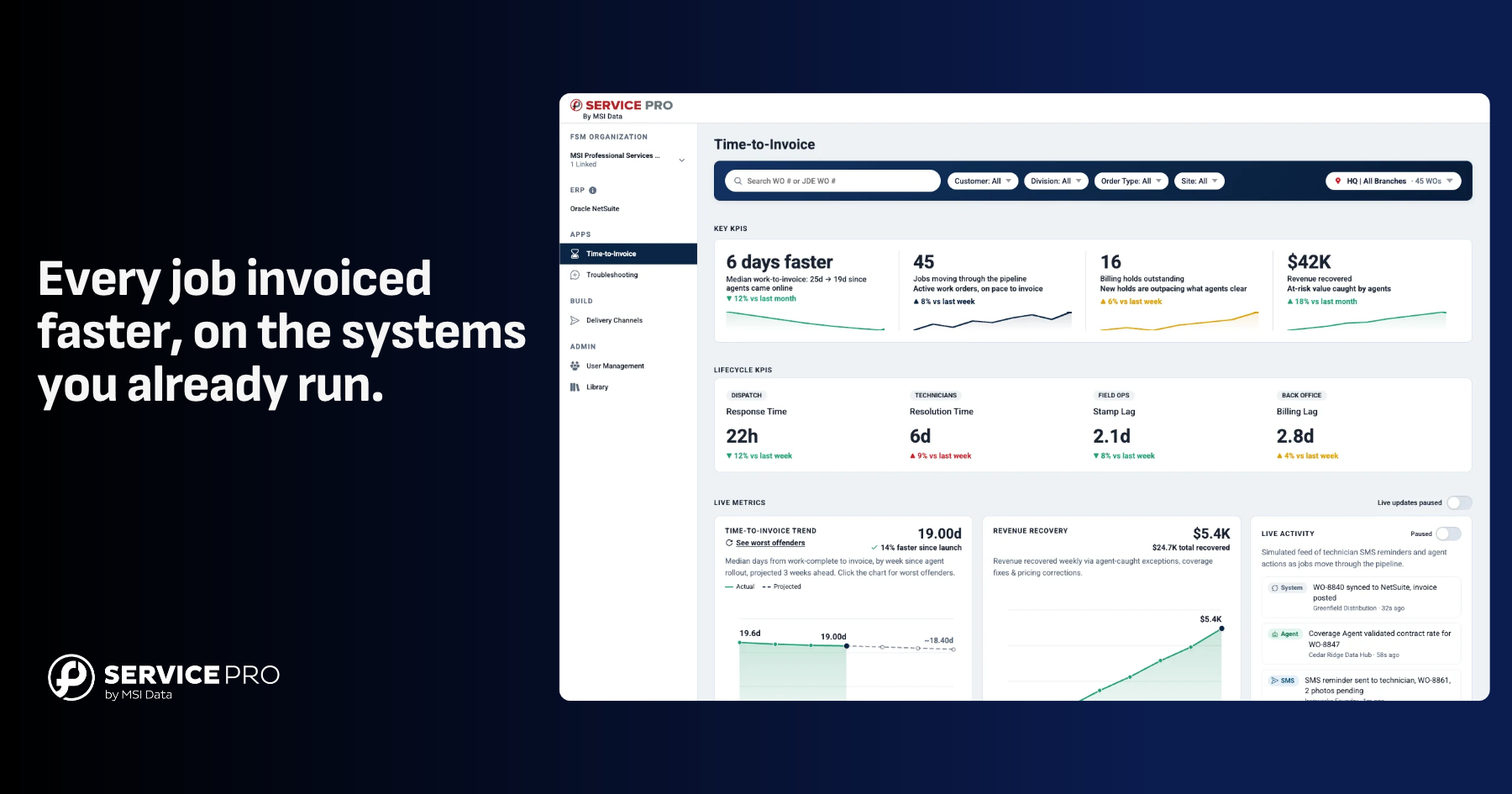
Service Pro works across three intelligence layers. Field Execution covers technician prep and time on site. Revenue Readiness turns field notes into records the back office can invoice from. Ops Intelligence, which is still rolling out, tracks where each job stands between completion and billing. Every Service Pro trial comes with a forward-deployed engineer from day one. They configure the system around existing workflows and coach technicians through real jobs.
Revenue Readiness and Invoice Ready Notes
Revenue Readiness covers the handoff between the field and the back office. Invoice Ready Notes, the live feature in this layer, takes what a technician captured on site and turns it into a structured summary tied to the work order. Job photos and customer conversation history attach to that same record. Early trial data shows up to 82% of these notes going to invoice unchanged or with a light edit.
Field Execution Agents for Cleaner Job Documentation
Service Pro's Field Execution agent layer, specifically the Job Prep Brief, gives technicians asset records, service history, and job context before they arrive on site. Better-prepared technicians produce more complete job documentation at closeout, feeding cleaner invoice records. This directly addresses the missing-notes problem that stalls billing.
Forward Deployed Engineer Support for Adoption
Every layer above only shortens time-to-invoice once technicians use Service Pro AI on every job. Getting a crew there means retraining. Few service leaders want to start that midyear.
Every Service Pro trial includes a forward-deployed engineer at no added cost. Setup starts on day one with a knowledge base built from your existing manuals and service records. Configuration is handled alongside your admins. Technicians get coached on real jobs, from loud shop floors to sites where typing isn't practical. The engagement has no preset end date and runs until your team has adopted Service Pro.
How Do You Start Reducing Time-to-Invoice with AI?
Start with one branch, one crew, or one job type. A contained pilot with a clear start and end date is easier to get approved internally than a company-wide rollout, and it gives you a real before-and-after comparison.
1. Baseline Your Current Invoice Time
Pull the last 90 days of closed work orders and calculate the average number of days between job close and invoice delivery. This number is the internal case to leadership and makes any improvement claim credible.
2. Audit Required Closeout Fields
Identify which fields are required for a complete invoice (labor time, parts, asset ID, technician signature) and check how consistently technicians are completing them today. Gaps here are what the AI will inherit, so fix the required fields first.
3. Pick One Branch or Work Type to Pilot
Choose the work type with the highest invoice volume and the most consistent job structure. Repeat maintenance work or inspection-heavy contracts are good candidates because the job scope is predictable and the documentation requirements are well-defined.
4. Review Invoice Exceptions Daily for the First 30 Days
Review every AI-generated invoice record that gets flagged or held during the first month of the pilot. The exception log shows where documentation gaps still exist and where coverage rules need refinement. After 30 days, the exception rate should be trending down. If it is not, investigate before expanding the rollout.
Take the tour to see how Service Pro handles job closeout, warranty checks, and same-day invoice sync in your operation.
Frequently Asked Questions
Can AI be used for field service invoice processing?
Yes. AI generates invoice records from completed work order data, checks contract and warranty coverage, and syncs records to the ERP, removing the manual steps that create delay between job close and invoice delivery.
How much can AI reduce time-to-invoice for field service companies?
Reference customers were seeing invoice cycles of 16 or more days before AI-assisted workflows, with visible reductions to around 5 days or less.
Does AI replace the billing team in field service?
The billing team shifts from data entry to exception handling. AI handles documentation and coverage checks, while the billing team reviews flagged invoices and approves anything above the set dollar threshold.
Does AI for field service invoicing require an ERP integration?
Yes, for same-day sync specifically. Without a connection between the field service platform and the ERP, invoice records still have to be manually transferred. Service Pro connects natively to Sage 100, NetSuite, Epicor Kinetic, Epicor Prophet 21, and Microsoft Dynamics Business Central.
How does AI help recover warranty revenue in field service?
AI checks warranty coverage at work-order intake, before the job is dispatched, so work covered under warranty is identified and billed correctly rather than written off. WPI recovered roughly $3.5M annually in warranty revenue after implementing Service Pro.
What invoice records still need human review with AI?
High-value jobs and multi-asset work orders should route to a human reviewer before the invoice goes to the customer, as should any job where contract or warranty status was flagged as ambiguous.
See what the wait between a finished job and a sent invoice is costing you.
Run the numbers