








Why Field Service Companies Still Use Spreadsheets to Manage Technicians (And What It Costs You)

It's 7:40 a.m. One technician has called in sick. Yesterday's compressor job has rolled into a second day. The dispatcher rebuilds the schedule with the spreadsheet open and a phone in hand, calling each affected tech and then every customer whose window moved.
Plenty of mid-market field service operations still start the day this way. The spreadsheet running the schedule was never built to show where money leaks. Finished jobs wait weeks for an invoice. A second truck roll for the same fault can look like a brand-new job. Understanding those costs starts with why the spreadsheet survived this long.
Why Do Field Service Teams Still Use Spreadsheets?
Spreadsheets earn their place early:
- They cost nothing
- A new tab or column bends the file to whatever the operation needs that week
- Every dispatcher and back-office staffer already knows how to use one
- Starting a new file takes no IT ticket and no sign-off
For a small crew working from a single location, a shared spreadsheet does the job.
They also stick around well past that stage. Across 25 sales calls reviewed by the Service Pro by MSI Data team, spreadsheets or Excel came up in 8 demos. Paper surfaced in 4. Those two outnumbered every named competitor combined.
They Filled a Gap the ERP Was Never Built to Handle
Many field service organizations run an ERP such as Sage, NetSuite, Epicor, or Business Central for accounting and inventory. In a lot of those operations, dispatch and field notes live in a spreadsheet instead. Across the same 25 sales calls, manual re-entry between field records and the ERP came up repeatedly as an operational problem. Someone at a desk types serial numbers and billing data from one system into the other by hand.
The Operation Grew Around Them
Nobody decided to manage 60 technicians with spreadsheets. They started with 10, added tabs and columns, then added a second file for contracts and a third for PM schedules. By the time the operation is large enough to feel the pain, the spreadsheet is load-bearing, and pulling it out feels riskier than keeping it.
No One Owns the Transition Decision
A spreadsheet that ran 10 technicians is often still running 40. Three seats share the decision to replace it. The service manager feels the daily friction. IT or operations owns the ERP relationship. The controller doesn't see real numbers until a batch report runs Tuesday morning. Each seat sees one piece of the problem. None of them owns the whole call. Switching also means a rollout and retraining. Many service managers won't start either one midyear, and the calendar rarely offers a better month.
Where Do Spreadsheets Break Down in Technician Management?
A dispatcher cross-referencing three tabs and making four phone calls to figure out who has the right skills and is closest to the job. When a tech calls in sick or a job runs long, the entire day has to be rebuilt manually: check the file, call the tech, update the row, notify the customer.
Scheduling Becomes a Memory Sport
A spreadsheet holds the plan as of its last edit. Every change since then lives in the dispatcher's head or in a phone call nobody logged. Assigning a new job takes the same kind of recall. Finding who holds the certification for that generator model and who sits closest to the site means cross-referencing tabs and working the phone. The whole schedule ends up resting on one person's memory. Service leaders already know that risk from their senior technicians, whose tribal knowledge walks out the door when they retire.
Technicians Arrive Without the Full Picture
A work order row in a spreadsheet carries a customer name, an address, and sometimes a note. It doesn't show the asset's service history or what the warranty and contract cover. Nothing in the row says whether the right part is on the truck. At the job site, the tech either guesses or picks up the phone. The call usually lands with the one senior tech everyone leans on all day. A wrong guess means a second truck roll and a hit to first-time fix rate.
Work Order Updates Arrive Too Late to Act On
Job status updates happen when someone remembers to update the file, end of day or when the tech calls in. The dispatcher doesn't know a job closed early until the technician is already sitting idle. The back-office staffer doesn't know a job is ready to invoice until the tech's notes land on their desk, sometimes days later. Reference customers were seeing time-to-invoice gaps of 16 or more days. The update lag directly causes idle technician time and delayed billing, two costs that compound across every job in the queue.
PM and Contract Schedules Fall Out of Sight
Preventive maintenance schedules and service contract terms both run on dates across dozens or hundreds of assets. Tracking them in a spreadsheet means maintaining that date logic by hand. A tab that was accurate in January is wrong by March unless every row gets updated. A missed preventive maintenance visit is a contract obligation left unmet. Those misses put renewals at risk.
What Do Spreadsheets Really Cost a Service Operation?
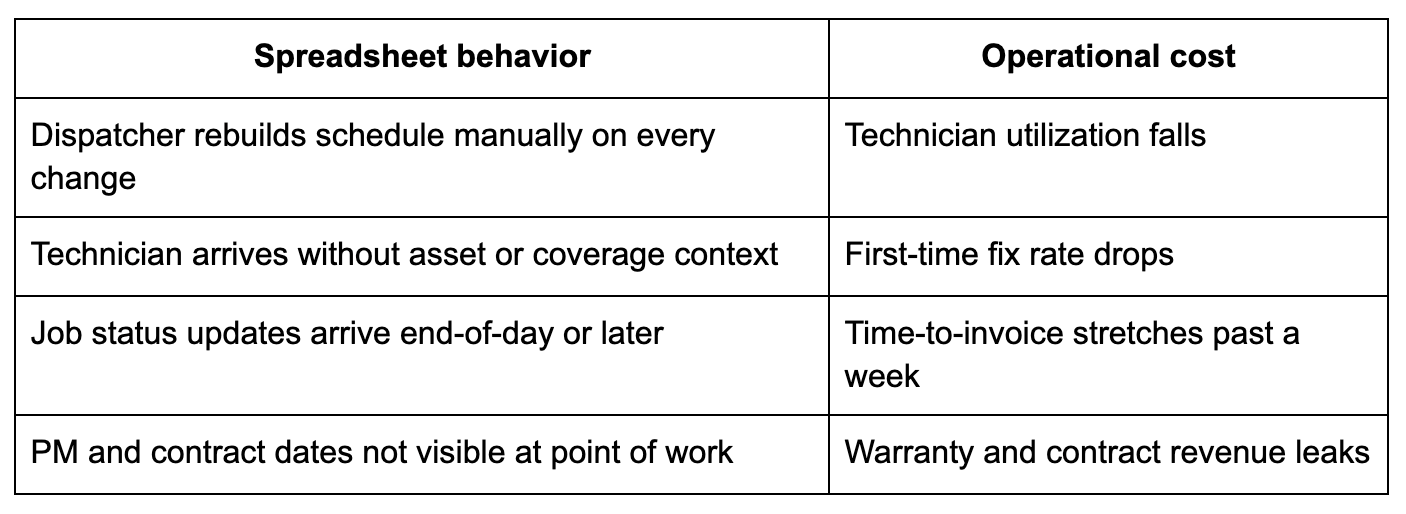
Each spreadsheet behavior from the section above produces a measurable operational cost. Here’s how the behavior maps to the outcome.
Technician Utilization Falls
When scheduling lives in a spreadsheet, the dispatcher can only optimize what they can see, and they can't see real-time technician location, job duration, or skill match without making phone calls. The result is idle time between jobs, wrong-tech assignments that require a second truck roll, and reactive scheduling that fills gaps instead of building efficient routes.
First-Time Fix Rate Drops
Every wrong guess at the job site shows up in first-time fix rate, the share of jobs resolved without a return visit. A technician missing the right part or the asset's history has to come back. Each return visit costs a second truck roll plus more technician time. It also pushes back the customer's fix.
Time-to-Invoice Stretches
Reference customers on spreadsheet-based processes were seeing time-to-invoice gaps of 16 or more days. The tech completes the job and writes notes on paper or in a text. The back-office staffer waits for those notes, reconciles them against the spreadsheet, fills in missing labor and parts data (sometimes by calling the tech back), then creates the invoice manually. Every handoff adds a day.
Warranty and Contract Revenue Leaks
Warranty reimbursement depends on labor and parts data reaching the back office. When that data travels on paper or into a spreadsheet someone updates later, every claim waits for the handoff.
Waukesha-Pearce Industries (WPI), a heavy equipment dealer, ran its service operation on paper work orders. Its back office spent entire days deciphering technicians' handwriting to build invoices. After moving to Service Pro, WPI's technicians send labor and parts data in the same day the work is done. Warranty reimbursements now go out on time. Within a year, WPI saw seven-figure warranty recovery savings.
What Metrics Show It Is Time to Move Beyond Spreadsheets?
Pull four numbers from your operation. If any of them are below the thresholds below, the spreadsheet is probably the constraint.
- Technician utilization rate: Billable hours divided by available hours. If you can't pull this number without a manual end-of-week calculation, the scheduling tool is the problem.
- First-time fix rate: The percentage of service calls resolved on the first visit. If you’re calculating this from a spreadsheet that only tracks completed jobs and not return visits, the number is understated.
- PM on-time completion rate: The percentage of preventive maintenance visits completed on schedule. If you can't pull a report today showing every PM due in the next 30 days with the asset, assigned tech, and contract terms attached, the spreadsheet is the gap.
- Time-to-invoice: Average days between job completion and invoice sent. If the number is above five days, the bottleneck is the handoff between field notes and back-office billing.
Most mid-market service operations running spreadsheet-based scheduling do not have a clean utilization number at all. The metric requires real-time job data that a spreadsheet can't produce. TSIA reports average engineer utilization of 90.6% among its Pacesetter field-service organizations, compared with 83% for the industry average.
What Should Replace Spreadsheets for Technician Management?
Service managers describe being burned by point solutions that "do one or two things, but definitely not the full package." A replacement system needs to connect scheduling, mobile execution, contract enforcement, and ERP integration in one workflow, because fixing scheduling without fixing invoicing just moves the bottleneck.
Scheduling and Dispatch in One Workflow
A connected scheduling system shows technicians' locations, availability, skill sets, and current job statuses in one view, without a phone call. When a job runs long or a tech calls in sick, the dispatcher sees the impact on the full day and reassigns from the same screen. The dispatcher optimizes based on a live picture of the operation rather than a spreadsheet row that was accurate this morning.
Offline Mobile Work Orders With Full Job Context
The mobile work order replaces the spreadsheet row the technician was working from. It carries asset history, warranty and contract coverage, parts on the truck, and prior service notes, all pulled from the system before the tech leaves the shop. Service Pro's mobile access works offline, which matters for industrial sites, basements, and power generation facilities where connectivity is unreliable. Offline capability is a requirement for equipment-heavy service organizations.
Contract and Warranty Coverage at the Point of Work
Coverage enforcement closes the warranty revenue leak. When contract terms and warranty dates are embedded in the work order rather than sitting in a separate spreadsheet tab, the technician knows at the moment of service what is billable and what is covered. Service Pro enforces contract and warranty coverage automatically at work-order intake, so the decision is made before the tech is on site, not reconstructed afterward by a back-office staffer.
ERP Integration Without Re-Keying Data
The pitch that lands immediately with service managers is eliminating the manual re-entry between field data and the back office. A field service management platform that integrates with the existing ERP means job completion in the field triggers invoice creation in the accounting system, with no spreadsheet bridge and no back-office reconciliation step. Service Pro connects natively to Sage 100, NetSuite, Epicor Prophet 21, and Microsoft Dynamics Business Central. The ERP stays in place and gets connected.

How Can You Move Off Spreadsheets Without Breaking the Operation?
The most common hesitation is the cost and timing of retraining. A transition is manageable when it follows a practical sequence rather than a full cutover.
Start With One High-Volume Workflow
Identify the single workflow generating the most daily friction, usually scheduling and dispatch or work order management, and replace that first. A contained first deployment limits retraining scope and produces measurable results quickly, building internal confidence for the next phase. Speed to value is the internal argument a service manager has to win with their own leadership, and a 30-day win on time-to-invoice or utilization makes the next phase easier to fund.
Clean the Data Technicians Actually Use
The most common reason a field service software implementation stalls is dirty data: asset records with missing serial numbers, contract dates that were never entered. Before migrating off the spreadsheet, audit the data the new system will need to function.
The records worth cleaning first:
- Asset records (serial numbers, install dates, equipment type)
- Contract terms and coverage dates
- Technician skill assignments and certifications
- Customer site information
Train Around the Dispatcher's and Technician's Day
Retraining resistance is highest when training is scheduled as a separate event disconnected from actual work. The most effective onboarding runs the new system alongside a real dispatch day, with the dispatcher using the scheduling board on live jobs and the tech using the mobile app on a real work order. MSI Data embeds a Forward Deployed Engineer with the customer's team during AI adoption because adoption is an organizational effort that requires hands-on support. The same principle applies to any new system: training that happens on the actual job sticks.
Measure Results After 30, 60, and 90 Days
Set a baseline on the four metrics before go-live: utilization, first-time fix rate, PM on-time completion, and time-to-invoice. Measure the same numbers at 30, 60, and 90 days. The controller and FP&A director often only join the conversation once reporting becomes the sticking point, and having clean 90-day numbers ready for that conversation is how the service manager wins internal support for the full rollout.
Frequently Asked Questions
Are Spreadsheets Ever Useful in Field Service?
For small operations running fewer than 15 technicians across a single location, a shared spreadsheet handles scheduling and job tracking without meaningful cost. The real issue is the absence of a clear threshold at which the operation has grown past what the tool can support.
At What Technician Count Do Spreadsheets Stop Working?
There is no universal number, but the friction typically becomes unmanageable when a single dispatcher can no longer hold the full schedule in their head and the spreadsheet becomes the only record of job status, asset history, and contract terms simultaneously. Operations running more than 25 to 30 technicians across multiple sites consistently report that spreadsheet-based management breaks down under the coordination load.
What Is the First Workflow to Move Out of a Spreadsheet?
Scheduling and dispatch, because it is the workflow that affects every other metric downstream. Utilization, first-time fix rate, and time-to-invoice all depend on getting the right technician to the right job with the right information, and replacing the scheduling spreadsheet first produces the fastest measurable improvement.
Can Field Service Management Software Connect to an Existing ERP?
Purpose-built field service management platforms integrate with common ERP systems so that job completion in the field flows into the accounting system without manual re-entry. Service Pro connects natively to Sage 100, NetSuite, Epicor Prophet 21, and Microsoft Dynamics Business Central, and the ERP doesn't need to be replaced.
How Do You Get Technicians to Adopt a New Mobile System?
Adoption is highest when the mobile tool delivers job context (asset history, parts on hand) that the technician previously had to call the office to get. A tool that saves the tech a phone call gets used. A tool that adds a data entry step gets ignored.
How Long Does It Take to Replace Spreadsheet-Based Technician Management?
A focused first deployment covering scheduling, dispatch, and mobile work orders typically goes live within 60 to 90 days for a mid-market operation, assuming asset and customer data is reasonably clean. Full replacement of all spreadsheet workflows, including PM scheduling and contract management, runs longer depending on data quality and the number of ERP connections required.
See what the wait between a finished job and a sent invoice is costing you.
Run the numbers