
Tracking the activities of one technician per assignment across the service team can be challenging enough, but some work just takes more than one. Are your apps strong enough to accommodate the wingman?
So you’re out in the—dare I say, “playing”—the field, when you realize you’re not going to be able to finish the job on your own. The problem with the generator is bigger than you thought and in order to finish before the end of the day,you need back-up. It’s time to bring in a wingman (wingwoman).
Depending on whether your company’s field service automation software is up to snuff, you could have a partner who’s got your back in minutes…or, if you don’t have a mobile field service app, you could be left to flounder on your own, leaving you in the dust with an unfinished job and unsatisfied customer.
Scheduling for Two
When we hear about service systems, it’s usually about how its features help a single technician do his/her job for each individual work order: how to schedule one tech, how a single tech can track his hours, how a mobile inspection app helps one tech perform a safety inspection, etc. But rarely do we hear about how to eases the scheduling, organizing, and tracking of two or more technicians for a single work order.
But having a wingman in the field is important, and often essential, so utilizing the necessary tools to manage multiple technicians can save schedulers, managers, and techs time and confusion, while ensuring your work orders are finished successfully the first time by incorporating the necessary information, equipment, and amount of labor.
Schedule Your Wingman on the Fly with Simple Visual Scheduling Software
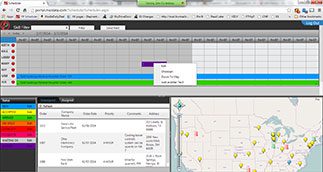
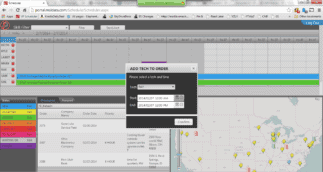
With technician scheduling system, adding a technician to a work order is simpler than walking up to a girl at a bar. As illustrated below, simply right click on the work order you want to add to, click “add technician,” then fill in the tech information (start and end time, etc.), and voila! you’ve added a technician on the fly. If only your real-life wingman could be that good.
Organizing Large Work Orders Using a Service Bill of Materials
The above example of scheduling technicians on the fly is for when you realize you need a wingman at the last minute. Things aren’t going as well as you’d like so you call for back-up.
The other strategy you can use is for when you already know you’re going to need help so you book your wingman and plan your technique ahead of time.
In order to map out success, companies can use a service bill of materials (SBOM) to book technicians, equipment, parts, hours, etc. as soon as the work order comes in. The SBOM feature allows you to configure–through predetermined, configurable categories–how many workers are needed, with which parts, for how many hours, and for which tasks.
For example, let’s say you’re an HVAC company and you receive a work order to install heating and air conditioning units in the city’s new high school. The building’s big and your company’s doing all the work, so if you want to have the job finished before Christmas 2020, you need to schedule multiple technicians for a number of hours with various parts and equipment for each task and technician.
Using an SBOM lets you record and organize this information, then send it to each technician through his mobile application. When the tech accepts the order, tracks hours worked and parts used, and takes notes on the job site, the SBOM stores that information so it’s clear what to charge at the end of the billing cycle.
How Segments Assign Tasks and Keep Technicians in the Zone
Some SBOMs have the ability to be segmented in order to specify tasks for each technician. This segments function provides greater granularity and insight into each work order.
Not only are technicians able to see exactly what they’ll be working on and what parts they’ll need, but company managers also gain deeper granularity so they can analyze the success of each task and determine ways to improve if needed.
Some examples of segment details technicians and managers can use include:
- Technicians skills used on specific tasks
- Tools and parts used for each task
- Number of hours each tech spends on each task
- Project forms needed to complete each task
- Steps required for each task
Conclusion: Two is Better Than One
When you get a big work order you should be excited, not anxious about being able to book the right number of technicians, parts, equipment, etc. let alone going through the confusing process of documenting and tracking all the work you did in the field.
Build your reputation as an organization able to meet the demands of a large or challenging work order and see what assignments you gain by establishing a plan for calling on and assigning extra technicians in the field. Who knows, you might even pick-up someone you used to think was way out of your league.

7 Best Practices for Choosing a New Field Service App
Managing a complex service organization, you run into dozens of scheduling and task management issues a day. Let us help as you choose the right software to keep everything organized. Use these tried and true methods for organizing the field service software buying process. Eliminate the unexpected and increase your chances of success with your new software investment.

Like this post?
Subscribe to our Field Service Management Blog for original weekly content updates.