So – you have customers looking for service, technicians ready to perform, but no way to manage or track your service orders.
What do you do?
Top service organizations will turn to a work order tracking template to get started. Alternatively, service organizations looking to automate or digitize aspects of their work order management is through a field service management technology.
Let’s start with the work order tracking template and the requirements you’ll need:
- Tracking customer and job information
- Status of the active service work
- Date created, scheduled, & started
- Any critical information about the specific job (waiting on parts, waiting on special tool, etc)
- Work order complete & invoice status
Download our work order tracking template here.
How to Use Our Work Order Tracking Template
Now that you have a work order tracking template to get you started, lets walk through the document together.
First, lets get your company information put into the template.
Putting in the basics such as legal entity name, address, contact phone and email are all that is needed. The last piece is to pop in your logo, so this is branded appropriately for your organization.
Alright, the basic branding and service organization information is populated in the template. *Our recommendation is to save this now as the primary work order tracking template for your organization.*
As we now progress into the work order and job information, we can start populating our active work orders. This will allow us to properly see where each job sits as far as % to complete.
As we start adding our work orders into the work order tracking template, we’ll want to ensure we both include all required fields as well as ensure we have a plan to keep this updated. Having a plan to manage and track this information is as critical as having a template to work off of.
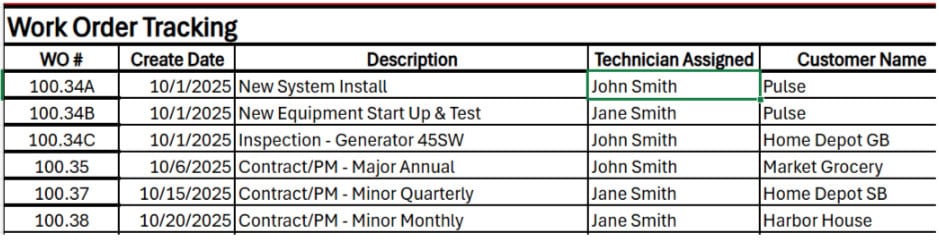
As you see from left to right, you’ll be adding various pieces of information to this tracker such as Work Order Number (WO#), Create Date, Description, Technician Assigned, & Customer Name. You can be as descriptive as you’d like throughout this form, but capturing the key pieces of information that you want to track and know is completely up to you and your team.
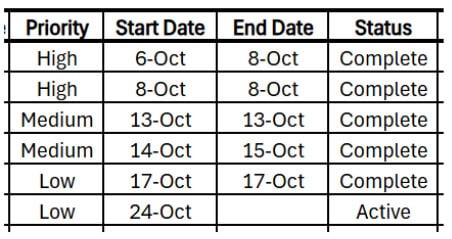
As we continue across the work order tracking template, we’ll be prioritizing this work or mapping a priority level to each job. This can follow a low, medium, high model, or a customer priority model that your team has created. Documenting the start date of the work or service is important as you start to understand job duration, planning out other jobs or future service as well as planning for billing. Of course, with a start date would come a completion or end date which helps understand when jobs are done. This then allows you to update the status of the work order from open, scheduled, or active to complete.
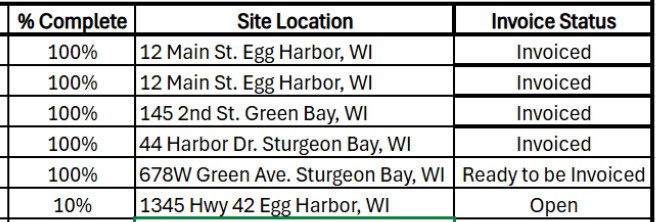
Status and % complete can be completely configured by your and your team, but also can be fairly simple to follow a model of:
- Open: NA
- Scheduled: 0%
- Active: 1%-99%
- How you track this will be up to you and your team
- Complete: 100%
Documenting where your technician is for their work order or service will help with planning additional work orders to just simply knowing where your team should be throughout their work day. Once jobs are completed, and you mark them as so, the next step would be reviewing the work to ensure all information was captured, service was performed up to standard, and get ready for invoicing.
When work orders are marked invoiced, you would then handle collecting payment through your ERP or Accounting system as a best practice.
Now you’ve gotten a work order tracking template, you’ve filled out the template with your work orders so you can track where your jobs sit, and you’re feeling organized. Good for you! This is a step in the right direction as your start to standardize your processes and track your open and completed work in a more organized fashion.
If you’re ready to level up beyond this template, give us a call and we’ll support you on your service maturity journey through automating and digitizing your field service operations.
Request your free consultation with the Service Pro team today!
Frequently Asked Questions
What is a work order tracking template?
A work order tracking template is a document (such as an excel or word document) where a service organization documents and monitors the status of all service jobs from creation to completion. As a service organization scales and matures, the need for a technology platform (such as Service Pro by MSI Data) becomes more needed to efficiently manage the lifecycle of work for a service team.
What’s the purpose of a work order tracking template?
The primary purpose of utilizing a work order template is to gain control over your service business, be able to monitor and track the progress of your service work, and to stay organized as a growing business.
What are the benefits of utilizing a work order tracking template?
Some of the benefits of using a work order tracking template are:
- Having a more organized & stable service operation
- Being able to properly plan for service work
- Invoice your customers timely for service work
- Gain visibility into your service metrics
How do I know if I need a work order tracking template?
This is different for each service organization, but if you are looking to grow and scale your service business, you will want to look at a path to better organization and structure. Having a process and a way to document and track your various service jobs will help you focus on the business instead of chasing updates and running blind. If you’d like to have a conversation about this further, schedule your free consultation here.