Introducing Service Pro AI
Hands-On Work. Hands-Free Answers.
Guide repairs in real-time and automatically generate detailed work summaries instantly.
Your best tech. In every tech's pocket.
Service Pro Al gives every field technician access to the same asset knowledge, troubleshooting patterns, and job history that your top performers carry in their heads.
Real-time AI guidance using your own manuals and service history
Service summaries write themselves from voice, text, or images
First-time fix rates improve when techs have the right context on-site
Junior team members work with the confidence of your most experienced field staff
Service Pro AI works with the data you already have — asset records, service history, and work orders — right out of the box.
Request a Free Trial of the Service Pro AI App
AI-Powered Tools Built for the Field
Three core capabilities work together to reduce friction, improve accuracy, and help technicians move faster—from diagnosis to closeout—without adding complexity.
AI-Guided Field Execution
Real-time intelligence that supports technicians during the job
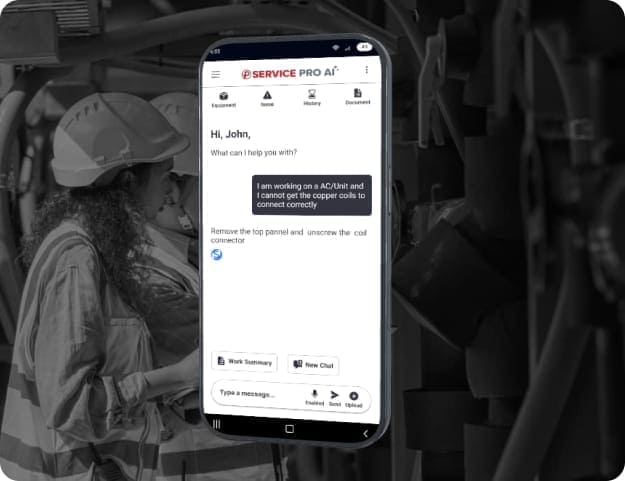
Service Pro AI works directly with technicians using voice, text, and images to support diagnostics, decision-making, and documentation while work is being performed. Instead of navigating manuals or relying on memory, technicians receive context-aware AI assistance tied to the specific asset, job, and service history. This reduces hesitation, missed steps, and incomplete work on complex service calls.
Automated Service Documentation
AI-generated service notes without manual write-ups
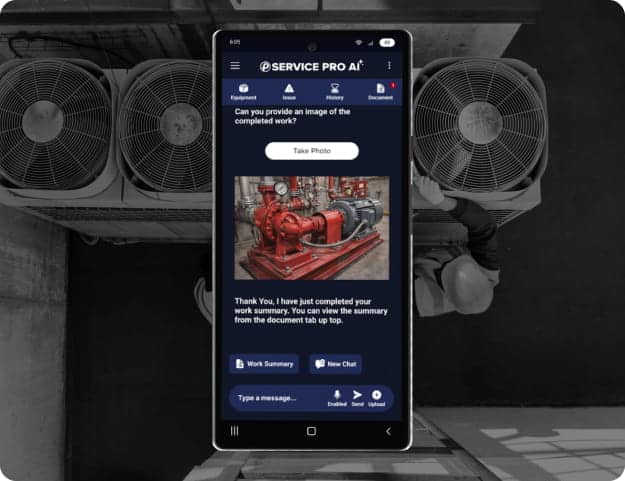
Service Pro AI automatically captures and summarizes completed work based on technician input and job context. Clean, structured service notes are generated in real time and saved directly to the work order. This eliminates after-the-fact typing, improves documentation consistency, and removes delays that slow job closeout and invoicing.
Asset and job context delivered automatically, not searched for manually
“ Service Pro AI helped me look at the problem differently, and I was able to resolve the issue because of it.”
Chuck Del Cielo, Service Manager
Close the experience gap without years on the job
Service Pro AI gives newer technicians access to the same asset knowledge, troubleshooting patterns, and resolution paths that experienced techs carry in their heads. Guided prompts and contextual recommendations help junior team members work through unfamiliar jobs with confidence, reducing escalations and callbacks. This means faster onboarding, less reliance on senior staff availability, and more consistent outcomes across your entire field team.
As soon as I made the first summary with Service Pro AI and saw how it formatted and how professional it looked, I really liked it. I was very impressed with that.”
1-Time
Data entry with our
integrated platform
We simply could not function effectively without Service Pro. Everything we need to do, it’s able to do.”
Managing Director, BTU Group
Mechanical Equipment
30%+
Increase in utilization of field technicians
The mobile application has been a game-changer, providing technicians with real-time access to job details, customer information, and service history.”
Director of Partnerships, Piedmont Door Solutions
Fire, Life & Safety Equipment
1-Time
Data entry with our integrated platform
Quick answers to questions you may have
How do technicians use Service Pro AI in the field?
Technicians can interact with Service Pro AI by speaking, typing questions or notes, or sharing images of equipment to get help while they are working. It’s like having your company’s expert technician in their pocket.
When would a technician use voice instead of typing?
Voice is useful when technicians are hands-on with equipment and need to capture details or ask questions without stopping work to type. Skip the annoyance of taking gloves on and off or constantly setting tools down, and bring the focus back to the work at hand.
How do images help Service Pro AI support technicians?
Images give Service Pro AI visual context about equipment, components, or issues, helping it understand the situation and support better diagnosis and documentation. Simply use your mobile device to take a photo or select one from your camera roll. Service Pro AI will analyze the image and cross-reference with your uploaded documentation to give the best answer.
What information does Service Pro AI use to respond?
Service Pro AI uses the company’s own work order history and equipment documentation, so guidance and summaries reflect how that organization services assets.
Does Service Pro AI change how technicians do their jobs?
No; Service Pro AI fits into technicians’ existing routines when and where they need it. Instead of adding extra steps, Service Pro AI reduces time spent searching, typing, and following up, creating a more effective and empowered workforce.
Get in touch with us at sales@msidata.com to get started.
See Service Pro AI working in your environment
- No generic demo. We walk through your actual use case.
- 30 minutes. That's all it takes to see if it's a fit.
- Service Pro customers are up and running without a separate setup.