Download Free Manufacturing Work Order Template (Microsoft Excel, Word & PDF)
When it comes to manufacturing work orders, there’s nothing worse than having incomplete or incorrect information. Luckily, solving this problem can be both easy and free.
Having an organized and standardized work order process can be achieved in two main ways. 1) use a digital field service software solution like Service Pro® by MSI Data to fully automate your field and back office operations, or 2) take a less intensive approach and use a template that can be customized and duplicated for your work order needs. The template we offer below is free, downloadable instantly, and comes in excel, word, and pdf formats to suit your preference.
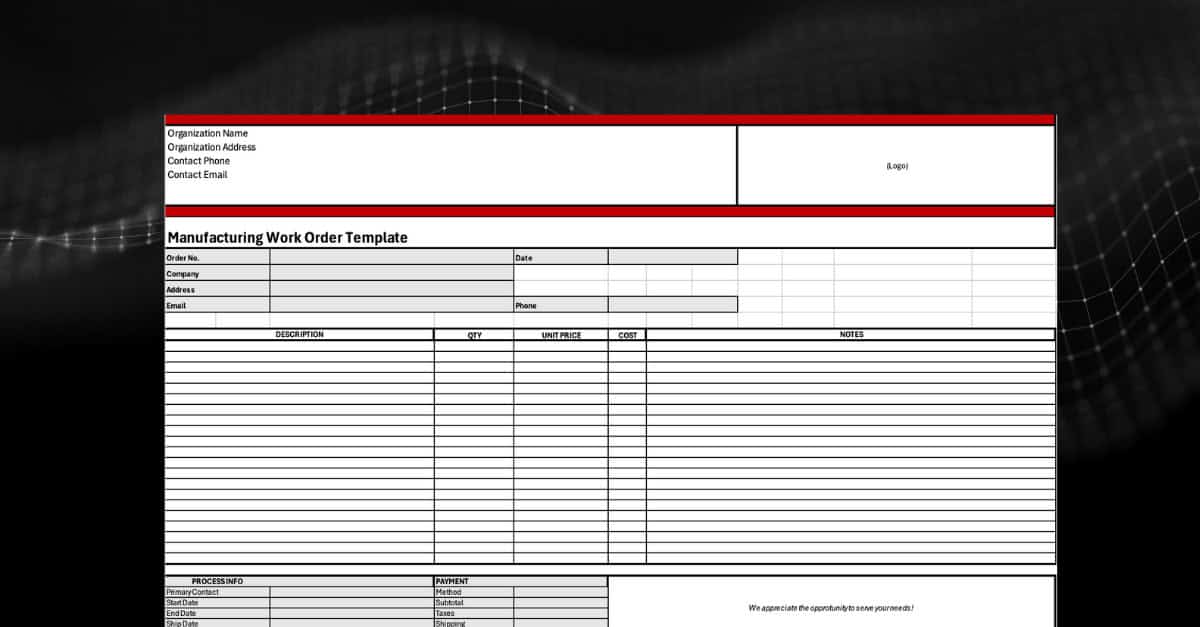
In addition to these benefits, you can find all the essential info a manufacturing work order template needs:
- Process info and payment information
- Space for descriptions, quantity, unit price and cost information
- Customizable for your branding and business details
–
Download our purpose-built manufacturing work order template here.
–
How to Use Our Manufacturing Work Order Template
Now that you have a manufacturing order tracking template in your preferred format to get you started, let’s walk through how to set up the document together.
First, let’s get your company information put into the template.
Putting in the basics such as legal entity name, address, contact phone and email are all that is needed. The last piece is to pop in your logo, so this is branded appropriately for your organization.

After your basic brand information is put in, we recommend saving from here to make the primary copy for all manufacturing work orders going forward. Each copy represents one work order, so feel free to make as many copies as needed.
As we now progress into the work order information, we can put in the work order number and customer company information. This section keeps highly used information at the top of your template for quick reference.

As you go, it’s important to make sure to fill in all fields and keep this sheet updated with any progress. Getting started with a template only yields results of progress is tracked regularly and kept up to date.
From there, scroll into the largest section, and work from left to right to add in descriptions of items, quantity, unit price, cost, and an optional notes section.
You can be as descriptive as you’d like throughout this form, but capturing the key pieces of information that you want to track and know is completely up to you and your team.

After you’ve input all the items for this work order, we’ll continue down the manufacturing work order template to fill out our last section. This is where you’ll put in your primary contact information, start date, end date, ship date, and courier.
In the payment section, list the method of payment, subtotal, taxes, shipping, and total all costs in the last row.

Congratulations! You’ve just found a better way to manage your manufacturing work orders. Once all your information is in place, make sure to save this template as an example for your organization and you’re ready to rumble.
As you go forth with this template on your own, it’s important to include all required fields as well as have a plan to keep this template updated. This template can be a real help as you start your service maturity journey and will put you in a position to have better insights into all your work orders, and you’ll be in a much more organized space.
If you are, however, looking to digitally transform your service operations and how you manage your work orders, we suggest you check out our field service management platform, Service Pro by MSI Data. We are a fully integrated field service management platform where you can do more than just automate work orders and manage equipment, but also completely manage your service operations.
Schedule your free consultation today!
Frequently Asked Questions
What is a manufacturing work order template?
A manufacturing work order template is a document that manufacturing service companies can use to organize work order information in one easy-to-use template. This can be a spreadsheet, PDF, or word-based template, like any of the three provided above, or companies can upgrade to a fully automated software solution like Service Pro® by MSI Data.
What’s the purpose of an manufacturing work order template?
The primary purpose of a manufacturing work order template is to have an organized process for documenting and organizing work order information. Within this template, you can organize contact, date, cost, payment, and quantity details, keep a pulse on the status and completion of your work orders, and expose inefficiencies in your processes.
How do I know if I need a manufacturing work order template?
If you are looking to grow and scale your service business, you will want to look at a path to better organization and structure. Having a process and a way to document and track your manufacturing work orders will help you focus on the business instead of chasing updates and running blind. Of course, this is different for each service organization. Another sign is: you’re reading this blog!
What are the benefits of a manufacturing work order template?
The benefits of a manufacturing work order template include:
- Increased visibility into your maintenance jobs
- Having a more organized & stable service operation
- Being able to easily find and access work order information
If you’d like to have a conversation about how to magnify these effects, schedule your free consultation here.