

How many days does it take your organization to go from job complete to invoice out?
That question opened our recent webinar, Time-to-Invoice: Closing the Gap Between Job Complete and Invoice. Michael Gonzalez, CEO of MSI Data, walked through why we built Time-to-Invoice and where revenue gets trapped. Shannon Ruffing and Tarrell Graham, co-founders of Solhver, joined for a fireside chat on what they’ve seen on site with field service teams this year. Alok Patel, VP of Product at MSI Data, closed with a live demo of the Time-to-Invoice Command Center and the AI agents behind it.
You can access the full recording via the form below, or keep reading for the highlights.
Why Time-to-Invoice Matters
Since late spring, our team has been spending time on site with customers in their depots, back offices, and trucks. One pattern has been holding across organizations: the field work gets done quickly. Dispatchers and technicians are running at full speed. The delay usually happens after the job is complete, when technicians and office teams still need to document the work, enter the details into the system, and get the invoice ready to send.
In the September webinar on time-to-Invoice, we asked attendees in a live poll how long that process typically takes. Most said between 15 and 30 days. Most other service leaders we ask say weeks, and the real number often runs longer than they expect.
That gap matters because the payment clock doesn’t start until the invoice goes out. Invoices sent later tend to get paid later, and for large service operations, the cost of that lag adds up quickly.
“The work is done. So what can you do to get paid faster?”
Michael Gonzalez, CEO, MSI Data
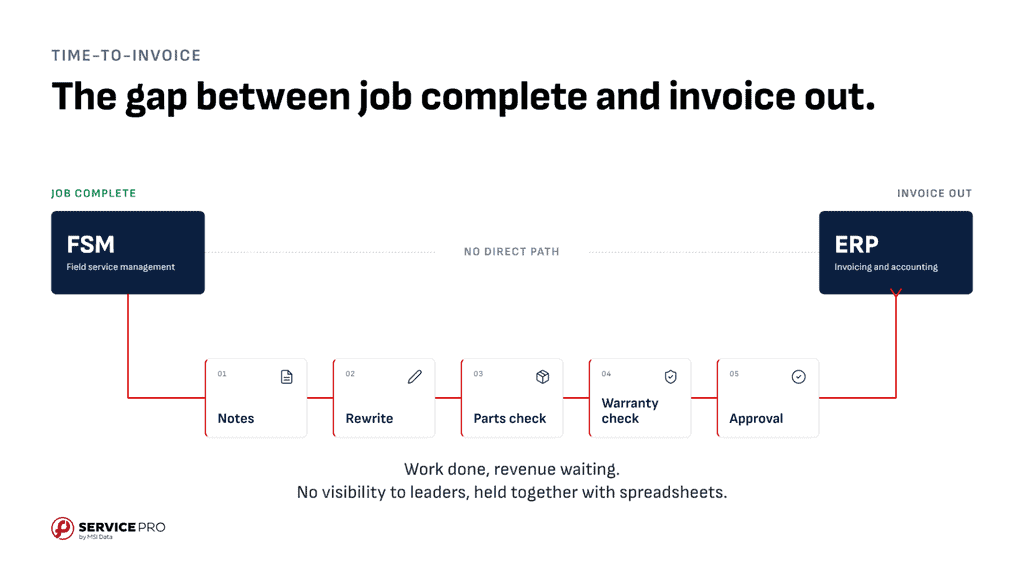
Answering that starts with finding where the invoicing delay happens. Integrations often get blamed as the pain point, when the real friction usually lives in the processes around them. On an architecture diagram, your field service management (FSM) system and your ERP connect with a clean line. In practice, that line is filled with manual steps. Technician notes arrive late, and the office rewrites them so the customer can understand them. Someone checks labor, parts, and warranty coverage, and a manager approves the order before an invoice gets built. If anything is missing, the back office starts making calls and sending texts to track down the technician.
“You almost have to pitch a perfect game every single time, which makes it really challenging.”
Michael Gonzalez, CEO, MSI Data
These delays can also mean missed revenue. Parts used on a job don’t always make it onto the invoice. Complicated jobs can sit waiting for someone to resolve the details., and smaller jobs are sometimes missed altogether.
“You end up having a happy customer, but you never end up sending out those invoices for $500, $1,000, $1,500. And those add up.”
Michael Gonzalez, CEO, MSI Data
Adding back-office headcount rarely fixes this, because much of the delay comes from waiting on information from the field. Hiring is also difficult on both sides of the business, for technicians and office staff alike.
Three Convictions Behind Time-to-Invoice
Three takeaways shaped how we built Time-to-Invoice, and they apply to any service leader looking at this problem:
- What gets measured gets managed. Measure one number, time-to-invoice, daily. Track the number of days from the last day of labor to invoice sent, and review it consistently.
- The delay is usually in the process, not the platforms. Map the pipeline and fix the bottlenecks. Your work order data already lives in your systems, so find where jobs get trapped, whether that’s with the technician, the back office, or both.
- Fix the workflow without replacing key systems. Keep the systems you already use. Your FSM and ERP stay in place. The goal is to add help where the bottlenecks are, moving from weeks to days and eventually to same-day invoicing.

Fireside Chat: Solhver on Time-to-Invoice in the Trades
To ground the discussion in what actually happens inside service organizations, we brought in Shannon Ruffing and Tarrell Graham, who both have deep experience in the trades.
Shannon has spent 10 years working across operations and finance. Tarrell brings 30 years of experience, having worked his way from technician to CEO. Together, they co-founded Solhver.
This year, they’ve also spent time on site with MSI Data customers, sitting alongside billers and dispatchers to see firsthand where invoicing slows down and how the work really gets done.
The Real Cost of a Slow Invoice
The operational delay feeds straight into the financials. When invoicing slows, AR builds, and the cash gap has to be covered somewhere, often with a line of credit and the interest that comes with it.
“When you’re not invoicing quickly…You’re essentially acting as a bank at that point.”
Tarrell Graham, Co-Founder, Solhver
Some of the costs are easy to miss. Lost parts and inventory eventually surface as unexpected COGS or inventory adjustments at month-end. And some unbilled work gets pushed through as a $0 invoice instead of a formal write-off, so the lost revenue never shows clearly on a P&L.
Where the Invoicing Delay Happens
Between the last day of technician labor and invoice sent, a lot of work happens in the office. Time entries get reviewed, usually 12 to 24 hours after the work is done. Technician notes full of acronyms, misspellings, and technical terms need translating into language a customer will understand. Someone also has to track the parts: what was used, where it came from, and what it cost. That information might live in a notes field, a photo of a handwritten ticket, or a form nobody checks often.
One admin Shannon and Tarrell met described herself as an investigator by trade, and billers immediately recognize the Sherlock Holmes comparison. Many of the clues live outside the system entirely.
“There is a group text somewhere in every org that we have… There’s all these conversations that are happening, and then when it gets to the back office to bill, they don’t have insight into those details.”
Tarrell Graham, Co-Founder, Solhver
Technicians share parts details and job site information over text, and the back office never sees it. What reaches billing might be a single line like “finished job, all working.”
The Biller Who Was the API
On an early site visit, Shannon and Tarrell sat with a biller as she walked through her invoicing process. Partway through, she opened a Word document. Inside were saved prompts she used with Copilot and ChatGPT. For each invoice, she copied the notes out of the sales order, pasted them into an AI tool with the right prompt, then copied the result back into the order. That added up to at least four or five copy-and-paste steps per invoice.
“She essentially made an Invoice Ready Notes agent, it’s just that she was the API. She was moving the data.”
Tarrell Graham, Co-Founder, Solhver
Her workaround was clever, and it revealed a workload that no metric was capturing, until we created Invoice Ready Notes (IRN). It runs in the background after a job wraps up, turns technician notes into a clean, invoice-ready summary, and writes it straight to the order, with no copying and pasting required. Hours freed from repetitive work like this can go toward tasks that need human judgment, like collections, a role few trades companies have fully staffed.
Why Start Now
Seasonality and annual planning make the end of the year a natural time to look ahead. But there is also a more immediate reason to address the issue now: AI adoption is already happening inside many service organizations, often without a coordinated plan.
During the webinar, Tarrell shared that across service businesses today, even if not directed to, most employees are already using AI in day-to-day work. This can improve individual productivity, but often ends up creating more fragmentation across the business as a whole. Once those habits and workarounds become established, they can be difficult to unwind.
“People are using AI in your org today… And they’re using it in a lot of ways that should be making you more efficient, but are actually fragmenting your systems.”
Tarrell Graham, Co-Founder, Solhver
Our AI-integrated approach inside Time-to-Invoice makes it a practical place to start. For companies that already have an FSM and ERP in place, improving the process does not require replacing core systems or asking teams to take on a major transformation.
As Graham put it, opportunities that combine meaningful impact with a relatively light burden on the organization are uncommon. Time-to-Invoice can be one of those rare opportunities to positively impact an organization in rapid time.
Those habits are hard to undo once they take hold, and scattered AI tools can break internal processes without anyone noticing. For teams already running an FSM and ERP, addressing time to invoice is a relatively light lift.
“It’s very rare that you find something like this where the load on your team isn’t huge and it’s impactful.”
Tarrell Graham, Co-Founder, Solhver
Now Available: Service Pro Time-to-Invoice
The Service Pro Time-to-Invoice solution is now generally available. It sits on top of your existing FSM and ERP systems, such as Salesforce Field Service and NetSuite, so there’s no rip and replace.
Different roles get what they need from the same view:
- Billers can work the ready-to-bill queue daily and see related orders for the same customer, so multiple invoices go out together.
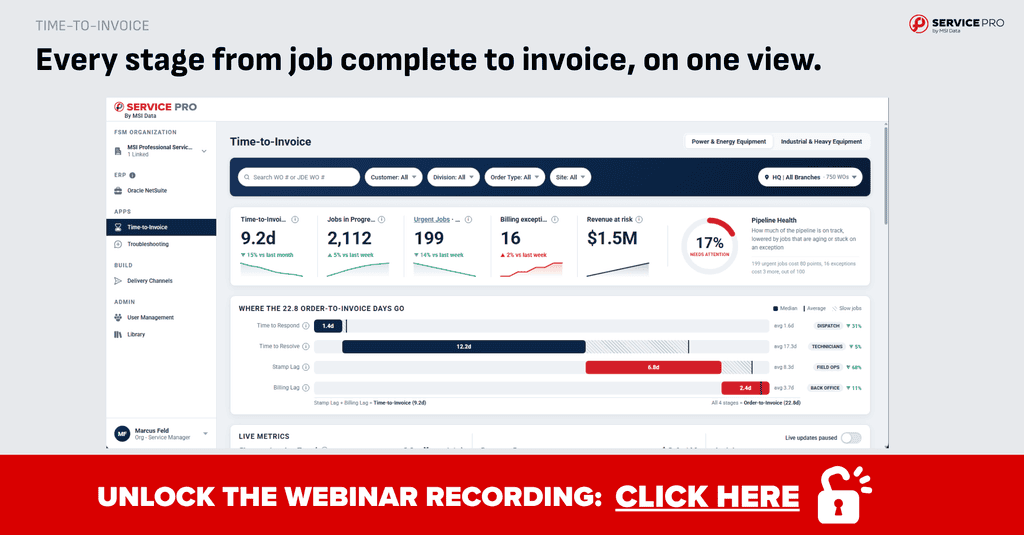
- Service managers can spot stuck orders, along with the technician, dollar amount, and days aged on each one.
- Leaders running multiple branches can compare time to invoice across locations.
Each job links directly to its source records in the FSM and ERP. In one demo example, a job completed on September 22 still showed as pending billing in NetSuite eight days later, and the platform provided a single, consolidated view of the situation.
From Visibility to Action: AI Agents And Time-to-Invoice
Seeing where jobs are getting held up is useful. The bigger picture is to help teams resolve those issues before they delay the invoice.
This is where the Time-to-Invoice AI agents come in.
Invoice Ready Notes takes technician notes and turns them into clear, customer-ready summaries using complaint, cause, and correction format. Those notes are added directly to the work order, reducing the amount of rewriting the back office has to do before an invoice can be prepared.
We are already seeing customers trust that output. Some customers are already seeing more than 80% of the AI-generated notes make it to the final invoice without any changes.
The upcoming Work Order Review Agent moves the process even closer to the field. As a technician finishes a job, the agent can identify information that is still missing and follow up by text while the technician is still on site.
During the webinar demo, for example, the agent confirmed which of two requested parts had actually been used, asked for before-and-after photos, and collected the technician’s notes through voice-to-text. When the technician mentioned that the defective part had been boxed for return, the system also recognized the warranty requirement, formatted the service notes, and completed the warranty claim.
The goal is simple: capture the information needed to invoice while the job is still fresh, rather than asking the back office to track it down days later.
The Solhver team shared that they expect the first improvements to show up in greater visibility and shorter invoicing times, particularly for simpler jobs. And even more meaningful cash-flow results should become visible over the following 60 to 90 days as faster invoicing begins to translate into faster collections.
Q&A Highlights
How does this make technicians’ lives easier?
The goal is to meet technicians where they’re at instead of adding another app to their day. Texting is something everyone already knows how to do, and voice follow-up is on the roadmap as well.
Is my data safe?
Yes. The ERP connection is read-only and uses standard APIs with OAuth. Nothing is written back to your ERP, your data isn’t stored in our systems, and it isn’t used for AI training.
See the entire Q&A in the full webinar here.
Join the Time-to-Invoice Waitlist
Time-to-Invoice is generally available today, and interest has been strong. To give each new organization hands-on support from our team, we’re onboarding through a waitlist. Join it, and we’ll reach out to talk through your operation and where your days are going.
Join the Time-to-Invoice Waitlist
Missed part of the session? Fill out the form to watch the full recording, including the live demo and Q&A.
Frequently Asked Questions
What is time-to-invoice?
Time-to-invoice is the number of days between when work is completed and when the invoice is sent. Because customers can’t pay an invoice they haven’t received, a longer time to invoice delays cash flow and increases the chance that parts, labor, or entire jobs never get billed.
What is the Time-to-Invoice Dashboard?
The Time-to-Invoice Dashboard gives service and billing teams one view across their FSM and ERP. It tracks time to invoice, shows where each order sits in its lifecycle, surfaces stuck orders, and compares performance across branches, with direct links to the source records.
Do I need to replace my FSM or ERP?
No. The Command Center sits on top of the systems you already use, so your FSM and ERP stay in place.
Is Time-to-Invoice available now?
Yes. The Time-to-Invoice Command Center is generally available for Service Pro and Salesforce Field Service with NetSuite. Because interest has been strong, new organizations are onboarded through a waitlist at timetoinvoice.com.
Is my data safe?
Yes. The ERP connection is read-only and uses standard APIs with OAuth. Nothing is written back to your ERP, your data isn’t stored in MSI Data’s systems, and it isn’t used for AI training.
How do I get started?
Join the waitlist at timetoinvoice.com. Our team will reach out to learn about your operation and talk through how to bring your time to invoice down.