








Field Service Knowledge Management: The Complete 2026 Guide

Your best technician just retired. He spent 22 years diagnosing equipment by sound alone, knowing every quirk of every asset in your customer base. And when he walked out the door, he took all of that with him. Meanwhile, your newest hire is on-site for the third time this month, trying to fix the same unit, calling the office, waiting on hold, guessing. Every truck roll costs money. Every failed repair costs a customer.
This is the field service knowledge problem, and it's more common than most operations managers want to admit. When the expertise that drives service quality lives only in people's heads, or is buried in a shared drive no one can navigate, your entire operation is one resignation letter away from a crisis.
The good news: the right knowledge management strategy closes that gap. In this blog, we'll break down exactly what field service knowledge management is, why it matters to your bottom line, and how to build a system that makes your whole team perform like your best technician.
What Is Field Service Knowledge Management?
Field service knowledge management is the practice of capturing, organizing, maintaining, and delivering the technical and operational knowledge field service teams need to diagnose problems, complete repairs, and serve customers effectively.
But here's what separates real knowledge management from simply having a folder of PDFs on a shared drive: a true knowledge management system is a living, dynamic resource, not a static archive. PDFs go stale. Manuals get outdated. A folder no one maintains becomes a liability rather than an asset. Knowledge management is the ongoing process of keeping that information accurate, searchable, and accessible to the right people at the right moment, which is usually on a job site, with a customer watching.
Why Field Service Knowledge Management Matters
The business case for knowledge management isn't theoretical. It shows up directly in the operational metrics that field service companies track every week.
Improved Productivity and Increased Efficiency
Every minute a technician spends searching for the answer to a problem is a minute they're not solving it. Whether they're scrolling through email threads, waiting for a callback from a senior tech, or hunting through a poorly organized document library, that friction adds up fast across dozens of jobs per week. When technicians can pull up the right troubleshooting guide or SOP on their mobile device in under a minute, jobs move faster, and more jobs get completed per day. That's not just convenience; that's a direct driver of technician productivity and revenue per truck.
Higher First-Time Fix Rates
First-time fix rate (FTFR) is one of the most closely watched KPIs in field service, and knowledge management has a direct impact on it. When technicians arrive at a job with access to accurate, up-to-date repair procedures, historical service notes, and equipment-specific guidance, they're far less likely to leave without resolving the issue. Repeat dispatches cost you labor, fuel, and credibility. A strong knowledge base gives every technician, not just the experienced ones, what they need to solve the problem the first time.
Faster Onboarding for New Field Technicians
When senior technicians leave, they take knowledge with them, and we're seeing that all across the industry. The traditional approach of pairing rookies with veterans doesn't scale, and experienced techs are too busy to mentor every new hire. A well-built knowledge base fills that gap, giving new technicians an always-available reference for procedures, common failure patterns, and step-by-step guides from day one. Ramp-up time shrinks, and the burden on senior staff shrinks with it.
Cost Savings Across Operations
Effective knowledge management saves money in multiple areas across your operation. Fewer repeat visits mean fewer unnecessary truck rolls, which cuts fuel, overtime, and vehicle wear, and save hundreds to over $1,000 per truck roll. Better-prepared technicians reduce the likelihood of incorrect repairs that trigger warranty claims. Less time on the phone with the back office means lower support overhead. And when onboarding is accelerated, you're not paying a full technician salary for someone performing at half capacity for six months. These savings compound quickly for operations running dozens of technicians across multiple territories.
Customer Satisfaction and Retention
Behind every satisfied customer is a field service team that showed up prepared and fixed the problem fast the first time. Customers don't see the knowledge base powering that outcome, but they feel it. The technician shows up on time knowing what piece of equipment to fix, the problem it's having, and with everything they need on hand to execute with confidence. Consistent, competent service builds the trust that drives contract renewals and referrals. Knowledge management is one of the least visible but most powerful levers for customer experience improvement because it ensures every technician, regardless of tenure, is delivering a service level that reflects well on your brand.
These are just a few of the many benefits field service companies can glean with an established knowledge base. Fortunately, there are solutions that allow field service companies to manage their institutional knowledge more efficiently.
Technology That Supports Field Service Knowledge Management
The right technology stack makes knowledge management scalable, searchable, and sustainable rather than a burden on administrators or unusable by technicians.
Field Service Management Software
FSM platforms are the operational backbone of any field service organization. They centralize work orders, asset history, service contracts, and customer data all in one place. The best platforms embed knowledge resources directly into the technician's mobile workflow, so the right guide or checklist surfaces at the right moment in the job.
Knowledge Base and Content Management Tools
Dedicated knowledge base platforms allow teams to create, tag, search, and maintain articles, guides, instructional videos, and SOPs in a structured environment. These tools make it easier to manage content at scale and support collaboration between office staff and field technicians in keeping content up to date.

AI and Machine Learning
Today's AI field service software tools can analyze historical service data to surface relevant articles based on the equipment type, failure code, or job description a technician is working with, without requiring them to run a search. Machine learning can also help auto-tag content for better retrieval and identify gaps in the knowledge base based on common search queries that return no results.
As a closed, secure system that pulls answers from your content, Service Pro AI brings these capabilities directly into your field service workflow, so your team spends less time searching and more time solving.
IoT and Predictive Data
When IoT sensor data is integrated with a knowledge management system, real-time equipment conditions can automatically trigger relevant troubleshooting content or predictive maintenance alerts, putting the right information in front of the technician before the problem escalates.
Types of Field Service Knowledge Worth Capturing
Not all knowledge looks the same, and a strong knowledge management strategy accounts for the different forms it takes across your organization.
Explicit Knowledge
This is the structured, documented knowledge that's easiest to capture: equipment manuals, Standard Operating Procedures (SOPs), troubleshooting guides, safety protocols, and parts catalogs. Most organizations have this type of knowledge somewhere, but the challenge is keeping it accessible and current.
Tacit (Tribal) Knowledge
This is the expertise that lives in the heads of your most experienced technicians, the tricks of the trade that can't be found in any manual. Capturing this knowledge before it walks out the door with your senior technicians is one of the highest-value investments a field service organization can make.
Contextual Knowledge
This is site-specific or customer-specific information that shapes how a technician approaches a job, including things like gate codes, customer notes, or other specific and unique instructions. Contextual knowledge often lives in CRM notes or someone's memory, and when it's lost, even small gaps can cause irritation and erode customer relationships.
How to Build a Field Service Knowledge Base
Building a knowledge base isn't a one-time project with a launch date and a ribbon-cutting. It's an ongoing system that requires deliberate setup, structured governance, and a culture of continuous contribution.
Step 1: Audit and Capture What You Have
Most field service organizations already have knowledge scattered across shared drives, email threads, OEM manuals, CRM notes, and the institutional memory of senior technicians, but it’s unorganized or inaccessible. Start by inventorying what exists, then identify what's outdated, duplicated, or missing entirely. To capture tribal knowledge, you'll need to be proactive. Effective ways to extract expertise before it becomes unavailable include:
- Ride-alongs
- Recorded walkthroughs
- Structured interviews with veteran techs
- Peer-documented tip sheets
Step 2: Organize and Make It Accessible in the Field
A knowledge base that can't be searched quickly is almost as bad as not having one. Build a clear taxonomy by organizing content by equipment type, problem category, customer segment, or service procedure, and use consistent tagging and metadata so search actually works. More importantly, the knowledge base needs to be accessible where technicians actually work: on a mobile device, ideally embedded in their existing workflow rather than requiring them to open a separate app. Offline access matters too, because not every job site has a reliable signal. Service Pro Mobile is built to support exactly this, giving technicians access to the knowledge and job information they need whether they're connected or not.
Step 3: Maintain, Govern, and Keep It Current
Outdated information is scarier than no information. A technician who follows an incorrect procedure because the knowledge base told them to is in a worse position than one who knew to call for help. Assign ownership to content areas, establish review cycles, use version control, and create a feedback mechanism that allows field technicians to flag errors or suggest updates from the field. Governance isn't glamorous, but it's what separates a knowledge base that lasts from one that gets abandoned after six months.
Putting Your Knowledge Base to Work in the Field
Building a knowledge base is only half the equation. The other half is making sure it actually gets used, at the right moment, by the right technician, on the right job. A knowledge base that sits in a system no one opens is just a more organized shared drive. The value comes when that knowledge is embedded in the workflow and actively surfaced where it matters most.
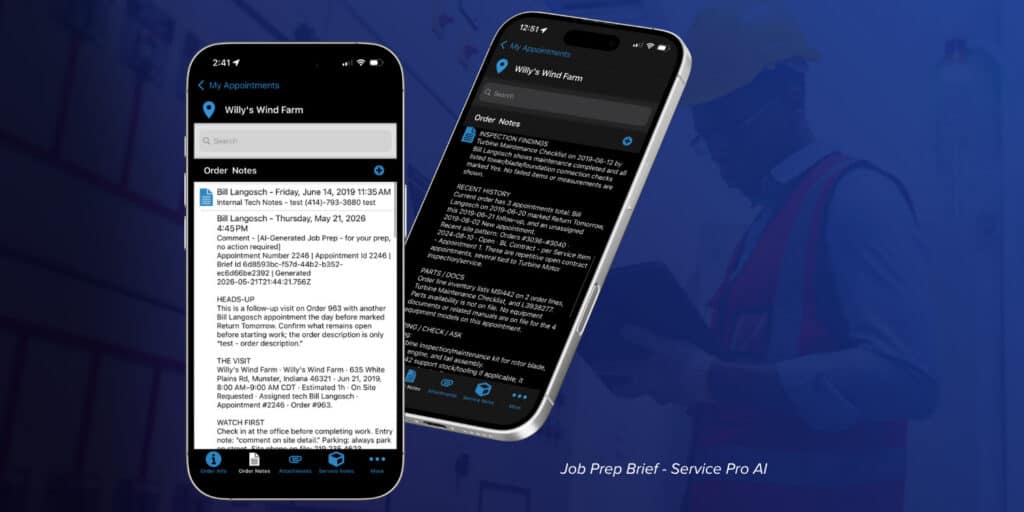
Context Before the Job Is Where First-Time Fix Rates Are Won or Lost
A technician showing up without context is one of the most preventable and costly problems in field service. Without a summary of prior service history or what was tried last time, techs walk in cold, customers have to repeat themselves, and jobs take longer than they should. Service Pro AI's Job Prep Brief solves this by surfacing relevant service history, prior inspection results, and customer notes before the tech ever gets out of the van. When a single unnecessary truck roll can cost anywhere from $175 to over $1,000, showing up unprepared isn't just frustrating. It's expensive.
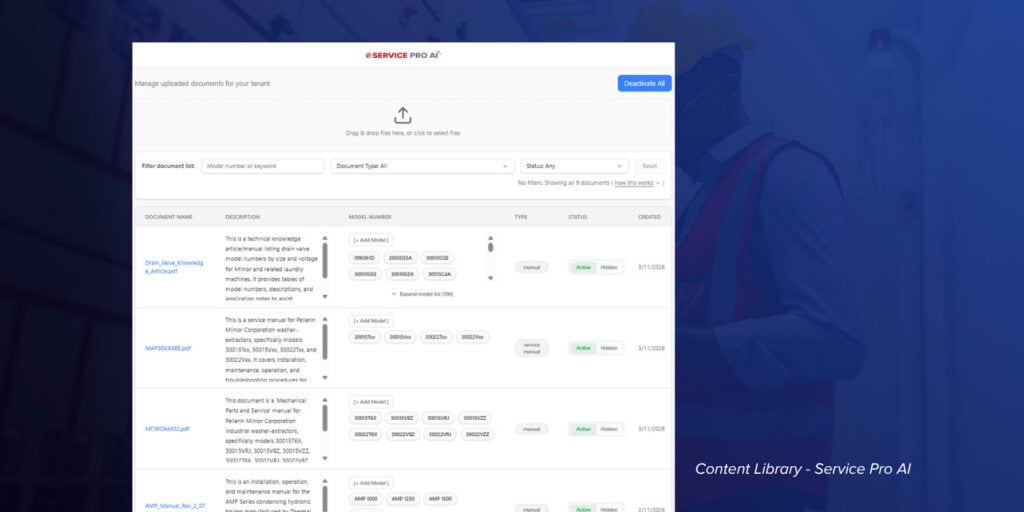
Grounded Answers, Not Guesses
Service Pro AI doesn't pull from the open internet. It pulls from data your organization has verified and uploaded: your manuals, your SOPs, your service history. When a technician asks a question mid-job, the answer is grounded in your operations, not a guess from somewhere online. Generic AI tools have been shown to recommend the wrong fix entirely when they lack the right data. Service Pro AI only works from what you control.
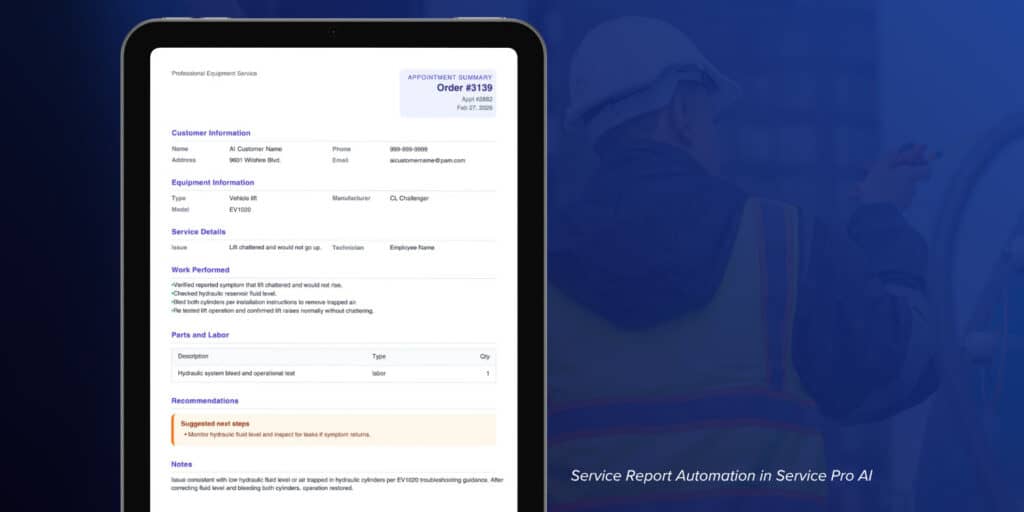
Every Job Feeds the System
The knowledge base shouldn't just be something technicians pull from. It should be something every job adds to. Service Pro AI's Service Report Automation captures what happened on each job and turns it into structured documentation automatically, without the tech having to write anything up. Over time, every appointment makes the knowledge base richer, preserving the hands-on detail that never makes it into a manual.
Streamline Field Service Knowledge Management with Service Pro
Service Pro by MSI Data is a field service management platform built for the operational realities of complex service organizations. It goes well beyond basic work order management to support knowledge management across the entire field service lifecycle.
Technicians in the field can access asset history, equipment documentation, digital checklists, and embedded knowledge resources directly within their mobile workflow, including offline mode for job sites with limited connectivity. Work orders are enriched with contextual information that helps technicians arrive prepared, and digital forms ensure that the knowledge generated on each job gets captured and fed back into the system.
Service Pro's reporting and business intelligence capabilities give operations managers visibility into trends across equipment types, failure patterns, and technician performance: the kind of data that fuels a continuously improving knowledge base over time.
Hundreds of customers have used Service Pro to reduce repeat dispatches, accelerate new technician onboarding, and improve first-time fix rates, turning a fragmented collection of documents and institutional memory into a structured, searchable, field-ready knowledge system.
If your field service operation is ready to stop losing knowledge every time someone changes jobs and to start building a system that makes every technician more effective, we'd love to show you how Service Pro can help.
See what the wait between a finished job and a sent invoice is costing you.
Run the numbers